enJOY it

an archived personal and craft blog from Elise Blaha Cripe.

IMG_7068

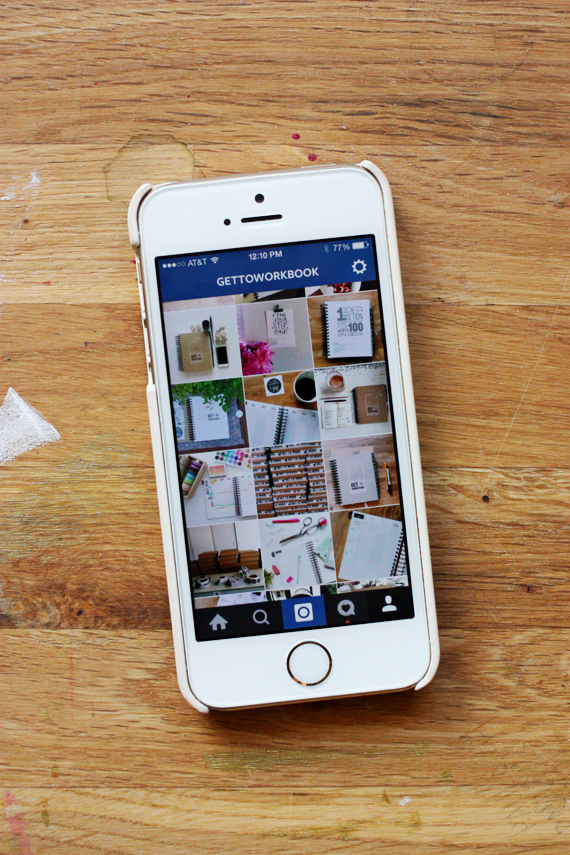
Last June I wrote a post about how I use Instagram to promote my online business (blog, shop and podcast). Since then, A LOT has changed except for the fact that IG is still my very favorite social media platform (and the only one I use with any real consistency).

So, I figured an update post was in order! But before we start, please know that YES! I do realize this is JUST social media. It's not life or death and how serious you want to take it is totally your call. I'd say I take it about 80% serious because it's a big part of how I keep sales coming in and my business alive.

Here's what's new :
IMG_7070

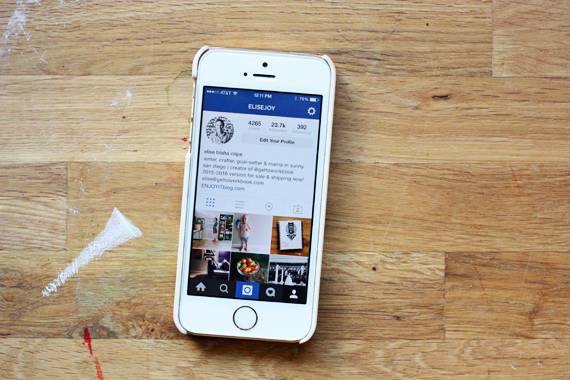
I currently operate THREE Instagram accounts. There's my personal one @elisejoy. Then there is a private one that is 100% just for close friends and family where I overgram Ellerie photos. Then there is an account dedicated to @gettoworkbook. I handle all three of these accounts very differently.
Untitled-2

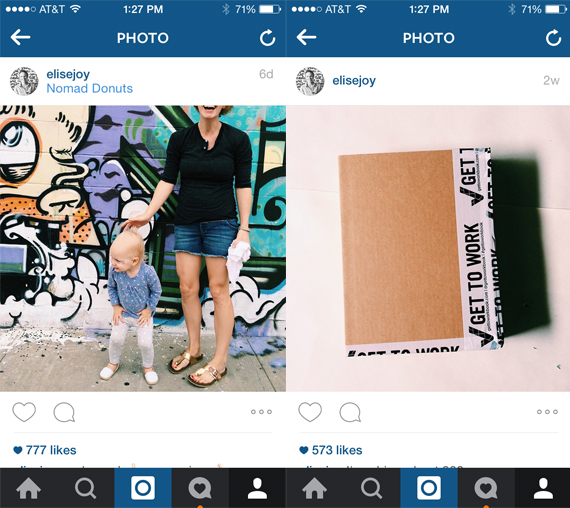
@elisejoy is about sharing bits of my work and home life. BITS being the key word. I am selective and critical about what "makes" this feed and have tightened that window over the past year. I work to share photos that are creative, informative, colorful & (for the most part) upbeat. This does not mean that my life is always all four of those categories. This does mean that those are the sort of photos I want to share. I still use this account to promote my blog, podcast and business BUT I also use it to document my family and our adventures. It's much more fun than work for me to share on Instagram and I really enjoy it.

the Ellerie feed is about sharing funny photos of Ellerie with our family. It's way easier to just post 8-10 photos a week there instead of texting them out. I don't edit, crop or care about what these photos look like, I just am sharing the nutty antics. I made this account private because I don't need to share this stuff with the Internet (even if the Internet was interested). I'm very happy with the level of sharing that I currently do on public accounts, but this private account gives me an opportunity to stay in better contact with those that actually know and love us. When the new baby comes, I will most likely just change the account name and share both kiddos there.
Untitled-1

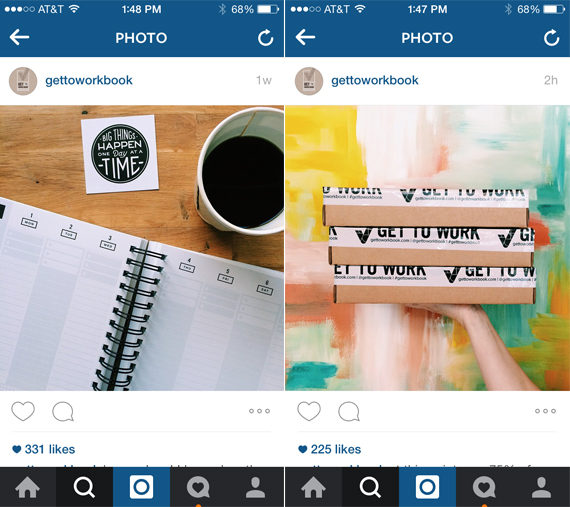
@gettoworkbook is about 100% promotion. Yep. This account is my number one tool for selling the GET TO WORK BOOK™ and all future products (!!!!) that will fall under this brand. I LOVE IT. I love that I split it off from @elisejoy. I use this account to share product photos, shipping updates, (hopefully) inspiring goal-setting tidbits and customer photos. Because this account is not personal, I think it makes sense to share photos of others using the book. I search the #gettoworkbook hashtag often to find photos and then share them on the feed, usually calling out something about the photo that I like and of course, crediting the original poster. It's a win, win, win. I get fresh content, the photo-taker gets some eyeballs and followers can see (and will be able to see more as July starts) how others are using the book.

TIP IF YOU USE IG FOR BUSINESS PROMOTION : most likely if you're trying to sell something online and you're using IG, you're expecting mobile purchases. I wish I had the data, but I think at least half of my GTWB orders come in through a phone or tablet while people are browsing IG or my blog. I set my website to be mobile friendly(ish) and I use paypal to collect payment. THIS IS KEY. As a consumer, I am much more likely to make a purchase on my phone when I can just pay with paypal in two clicks. It's VERY UNLIKELY that I am going to type my credit card number and address into my tiny phone screen. Yes, I might go sit at my computer and do it, but if you don't except paypal (or other mobile friendly transaction app) you might be missing out on sales.

Untitled-1

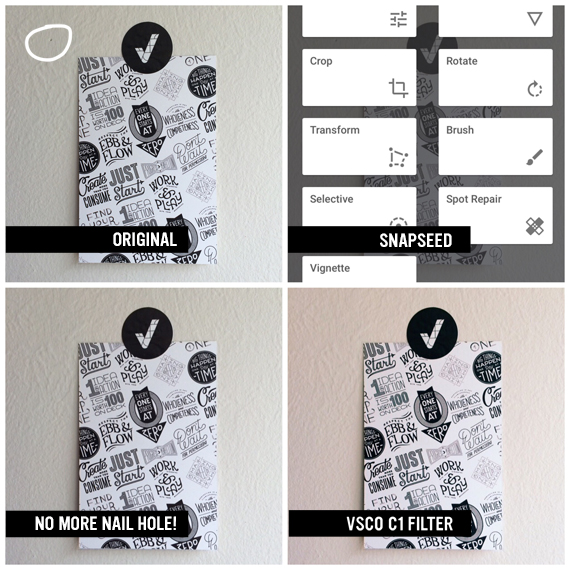
I process all my photos using the VSCO app. I used to be 100% #nofilter. And then I got tired of seeing "everyone's" photos really "popping" in my feed and mine sort of sitting there, dully. So for the past year, I have been using the VSCO color boost filters (C1, C2, C3) most often. For black and white I use B1. All of these are probably very over-used filters on IG and they might be ones that you hate (or you might hate ALL filters!), but for my vibe and my photos, I tend to be pleased with the results. In the photo above, you see the original on the top left, then the exposure lightened a bit and then C1 for the finished image.
IMG_2245

Occasionally I'll retouch a photo with the Snapseed app. I am so overwhelmed by this app, but I have found that the spot repair button to be a lifesaver. There's a wall in my office that gets good light and I'll tape stuff to it occasionally, but it has a leftover nailhole. I like to just "spot repair" that hole away and boom! Clean, non-distracting background.
IMG_2240

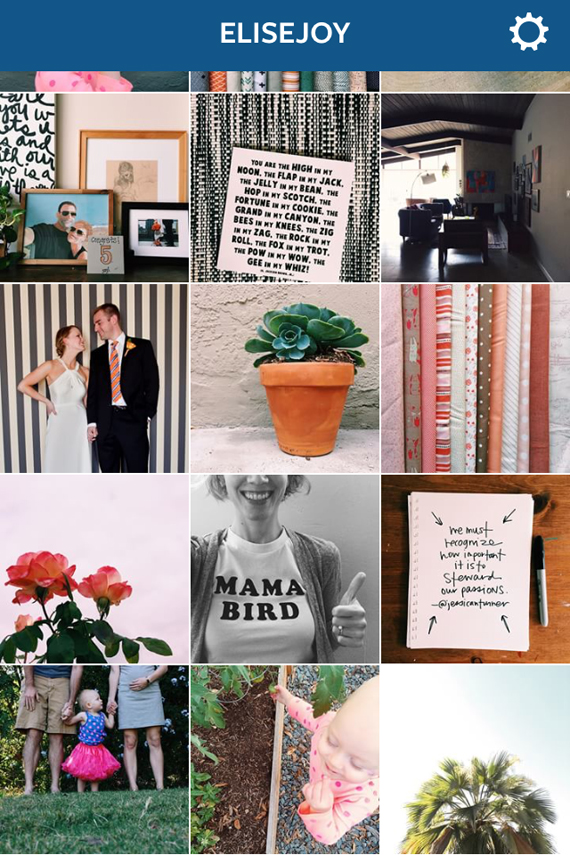
I think about the feed as a whole. I used to just throw up a photo, without thinking about how it would look on my profile feed. BUT NOW, like a crazy person, I think about the last few photos (like actually go and look at them) and see how the colors of the next photo will fit in. I don't want two blue sky photos right next to each other or two black and white photos one on top of each other. This is completely ridiculous and over the top, but I started caring and now I can't seem to stop. I also never, ever (I don't care if it's the greatest photo in the world) share anything that isn't cropped in a square. Having a feed that's not perfectly gridded out makes me anxious. Can't do it.

Here's what's not new:

I still take the same 8 photos. If you've been here awhile, you know I have some photo composition "go-tos" and I never vary from them. Boring? Yes. Easy? Yes. Cliche? Probably. Branded? Absolutely. I've outlined most of the photos before but in sum: product held in hand, object on a wooden table, looking down at my feet, cropped up so you can see lots of sky, shot straight from above, camera resting on the ground or table, stuff coming out of the frame as if it was "causally" strewn about.
IMG_2243

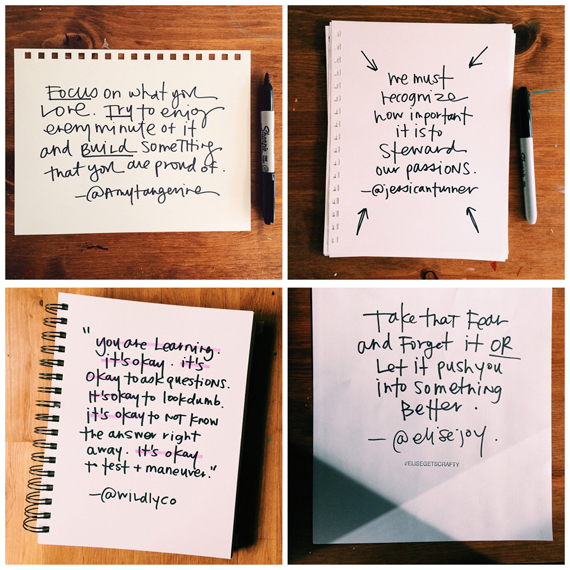
I still use Instagram as my #1 way to promote my podcast. But I changed how I do it and I love the new format. I used to just write the guest and show title on a paper and hold it in some arty way. Now I pull a quote from the episode and write that out in sharpie and take a photo of it. It's a MUCH more shareable and exciting method because it gets people to say "great point!" or "I needed this today!" and sometimes they tag their friends who might benefit from this tidbit and that helps me get the podcast more listeners.

What do you think? Totally insane?! YES! Still super fun though. 😉

ps, you might also be interested in:

Posted in ,

41 responses to “how I’m using Instagram these days.”

  1. Lori Avatar
    Lori

    Just the right amount of insanity, I say. 😉
    I absolutely loved this post. SO informative as I’m always wondering whether you bother with filters of not. Thanks so much for sharing.

    Like

  2. Kristina B Avatar

    Oh I love this! And I have TOTALLY been doing the thing now where I look at my feed as a whole! Sometimes I’ll throw up (ew) a video or a picture just for the day and then take it out because it doesn’t “match”! ha!
    I throw in the occasional circle shot too but not to many in a row. Gotta police the circles.
    I also have the “casually strewn” photo in my repertoire.

    Like

  3. Leah Noble Avatar

    Love it! I’m a big IG user and I love thinking about how to use it for business and personal uses. Thanks Elise!

    Like

  4. Ann Avatar

    I’ve never heard of snapseed. I’ll have to take a look at that. I’m the same way with looking at the feed as a whole. Isn’t it funny? But I think this along with Pinterest makes a big impact. I really liked this post- thanks for sharing.

    Like

  5. Stephanie Avatar

    I love all your posts, but posts like these are my fave!
    I don’t have my own business (yet) but I am hoping to make my little blog and IG account grow. You’ve definitely inspired me to take my IGing to the next level 🙂

    Like

  6. Stephanie Avatar

    Also – my motto: as long as you’re enjoying it, who cares if it’s crazy? 🙂

    Like

  7. Julie Avatar
    Julie

    Not insane! I love IG and I love this!!

    Like

  8. Anna Avatar

    I don’t have kids or an online business to promote, so the advice isn’t directly applicable to me, but I love the idea of keeping a separate account for Ellerie photos. I think you strike a great balance of sharing bits of your family and everything else you’ve got going on in your life/business/crafting – it feels like just the right amount of personal and professional.
    And I am the same way about using just square photos on Instagram – seeing feeds with all different-sized photos makes me twitchy!

    Like

  9. Whitney Avatar

    I always check the last few photos on my profile before posting another, as well! Lately I’ve started posting the photo, checking how it looks in my feed, then quickly deleting it before re-posting with filters and caption. Totally overboard! But you’re right, once you start caring you can’t seem to stop!

    Like

  10. Traci Avatar

    Definitely not insane! I have two instantgram (as my husband calls it) accounts. One is personal and private and mostly filled with photos of my pup! The other is the public one, still where I share bits of my day, but it’s for my website. I only wish there was a way to easily switch between the two accounts instead of logging into each every single time. If there is a way and I’m missing it…please share!

    Like

  11. Kim White Avatar

    YES…I agree with Traci! I love and use IG daily, but wish it would toggle between IG accounts on my iPhone similar to Twitter. That would make life easier! I’ve chosen to only use on IG account for now because switching back and forth was too much of a pain! Thanks for the post, and photo editing tips too!

    Like

  12. Hanna Avatar

    Elise, do you have any tips for taking the photos? What I mean is, that I’m working from home, and would love to share more on IG as I love the platform, and it’s pretty perfect for my brand, but I can’t think of things to share. Most days, I sit at the computer and do boring tasks. And, I have no kids, so no cuteness factor whatsoever.

    Like

  13. Leah Noble Avatar

    I agree with you on that, on the toggling back and forth being a pain.

    Like

  14. Carrie Avatar

    Good insights and tips. I tend to overthink it sometimes too. 😉
    Carrie
    http://www.wearwherewell.com

    Like

  15. elise blaha cripe Avatar

    this whole comment made me laugh! seriously so addicting, no?!

    Like

  16. elise blaha cripe Avatar
  17. elise blaha cripe Avatar

    there isn’t an easy way to switch back and forth and it’s such a bummer. I hope IG comes up with something quick!

    Like

  18. elise blaha cripe Avatar

    interesting! I will have to think about this and do a post. Something that helps me is just to see what sort of photos people post that I like. Then, sometimes I can take a spin on that. Or you might think about stockpiling photos? like going on a photo hunt through your house or city, whatever and taking some photos so you have stuff to share throughout the week but don’t have to go searching everyday?

    Like

  19. Emma Avatar

    Oh I thought I was the only person who carefully curated my instagram feed. I don’t feel so nuts anymore 🙂

    Like

  20. Margaret Avatar

    I’m so glad I’m not the only one who ‘over thinks’ Instagram! One thing I realized when looking through my own feed is that I’ll have like six blocks with one similar color theme–lots of blues in a row or three squares with similar yellow tones. Short little trips have always end up with the same color tones throughout all the photos and it’s totally accidental. Even if the photos are taken at totally different places/times of day. I guess it’s maybe indicative to my mood during that short span of time?

    Like

  21. Naomi Avatar

    Totally agree on the square format only point! I’ve been wondering how do you take the ‘from above’ shots? You had a brilliant black and white one on the aircraft on the way to Maui. When I try, my arm always gets in the way!

    Like

  22. Katie Avatar

    I love this post! And I agree, just the right amount of crazy – ha! I was wondering the same thing as the question above, how’d you take that airplane photo of you and ellerie? I tried it on the plane and my arm was totally in the picture, lol!

    Like

  23. Leah Noble Avatar

    I totally wondered about that shot too!!

    Like

  24. Leah Noble Avatar

    Maybe she asked the flight attendant to take it. She IS super committed to her feed, LOL. 😉

    Like

  25. elise blaha cripe Avatar

    I just held my arm up. That’s what I always do and that one just turned out great. 🙂

    Like

  26. elise blaha cripe Avatar

    I held my arm up. Somehow it didn’t get my arm. 🙂

    Like

  27. Joelle Avatar

    A friend of mine has two accounts and she uses her iPad for one and her iPhone for the other. She takes everything on her phone with the better lense and it syncs over to her iPad so she can post from there. Of course if you have one device that won’t work, but if you have two, it might be something to consider.

    Like

  28. Sarah Milligan Avatar

    Loved reading this, Elise! I love Instagram and find it the easiest form of social media to use. It really does drive traffic and I also feel like it makes me think about branding as a whole much more carefully. Plus, I find it really fun. I used to just post whatever but after studying what ‘makes’ the feeds I love, I also started editing my pics (I use Afterlight) and putting more thought into the visual cohesiveness. Sometimes I fear I am wayyy overthinking it, so I was really glad to hear that you think about these things too! Your feed comes across as so effortless, so you’re doing a very good job. 🙂
    My trick for assessing how pics will look next to each other (I have to see them before I put them up, can’t visualize how they’ll go together) is to keep an album in my phone for all IG pics. I take pics and edit them, then save them to the album and that way I can move them around and see how they will look. It goes in reverse order to the way they show up on IG (new pics end up on the right rather than the left) but works well otherwise. Planning them out/considering the whole makes such a difference to how the feed looks. This morning I posted something in a hurry because I was excited about the photo, but it’s been bothering me all day because the colours don’t mesh well with the neighbours! Ah well, it’s a skill to hone for sure. I love your feed and the point you made in your last IG post about handwriting notes rather than creating digital graphics… that was such a good point. Really keeps the personality in your feed.

    Like

  29. Kelly Avatar
    Kelly

    You might want to change “except PayPal” to “accept PayPal.” 🙂

    Like

  30. Gina Avatar
    Gina

    Good info! I’m just getting into instagram and learning. Total novice question here – you have to have multiple email accounts for more than one instagram account, right?

    Like

  31. Shana Avatar
    Shana

    Did you pay extra for the C2 and C3 on VSCO? I only see C1.

    Like

  32. Stacy Avatar
    Stacy

    I was just going to say this–spot on! If it’s fun, your enthusiasm will show and you’ll attract more business!

    Like

  33. Hello Today Create Avatar
    Hello Today Create

    Loved reading this post, because I was nodding my head agreeing to everything! Plus brilliant idea of your iPhone tripod! Hello! How easy is that!
    I have two Instagram accounts as well, I use my iPhone for one account & my iPad for the other, both have the same apps etc & I find it easier for not logging on & off all the time. Plus with photostream all the photos you take are shared between the two devices! Easy!

    Like

  34. Katie Avatar
    Katie

    Thanks, Elise, for the quick VSCO Cam tutorial! I’ve been wanting to try it, but always nervous to breakaway from the basic Instagram filters that do the job “enough.” So – thank you for a quick run through of what works for you!

    Like

  35. katie Avatar
    katie

    Thanks for your awesome tips. I am trying to grow my Instagram followers right now, so these are great tips to know how someone so successful did it. I love yor blog and Instagram feed – it’s so I spiring and makes me think it is possible to make your passions your job! Thanks for the inspiration and constant encouragement.

    Like

  36. Hanna Avatar

    Would love a post, so looking forward to that. In the meantime, creating a stock is something I’m slowly getting into. It’s not easy, as I’m one of those people who just doesn’t remember to bring out their phone when something cool is happening. It’s always an afterthought. Thanks for the ideas, Elise!

    Like

  37. a touch of domesticity / katie sparrow Avatar

    This was so interesting! This is kind of ‘I-geek-out-over-all-Elise’s-articles’ but I didn’t read any of my bloglovin feed over the weekend and then looked yesterday and I had 102 blog posts to read! As I scrolled down I saw your instagram post somewhere around 30-40 and I’ve been gradually chipping away at the list til I finally got here. Woop woop! And, in other news, I totally need to stop getting inspired by so many blogs. I must spend an hour reading them every day (and I’m selective in skipping some). Think what I could use that hour for!!

    Like

  38. Lindsay Avatar

    As always, I love and really appreciate your tips and tricks! Thanks!

    Like

  39. jessica o'brien | jessohbee Avatar

    i’d say your tomatoes are another branded photo 😉 i feel like i want to care more and edit myself more, but working in marketing and social media all day, i am zapped of restraint on my own channels. ha! loved this post though – such cool insight to your work. xo

    Like

Leave a reply to katie Cancel reply