enJOY it

an archived personal and craft blog from Elise Blaha Cripe.

Shoptable

I have been getting a few questions recently about my online shop – how it's hosted, what I recommend, etc. – and so today I wanted to share some thoughts. I designed and coded my own website and shop from scratch. No templates. No systems. Just me, a very old version of Dreamweaver and the two HTML classes I took in college.

Dreamweaver

To be clear: my HTML knowledge is limited. I never really got the hang of frames (do people still use frames? Surely, they do, yes.). I don't understand flash (do people still use flash? Probably not as much since it doesn't work as well on mobile…). But I do know the gist of what holds HTML together and I have a good understanding of tables (which are the grids that I use to "set-up" all my pages.

So I know enough to build a site that accomplishes what I need it to do. I actually LIKE that I am limited in my abilities to code a website because instead of saying "the sky is the limit, do whatever you want" to myself I say "this is what you can do, so figure it out within these parameters" to myself. And I have found that the limits of the latter make things so much easier (and faster).
Shoptalk

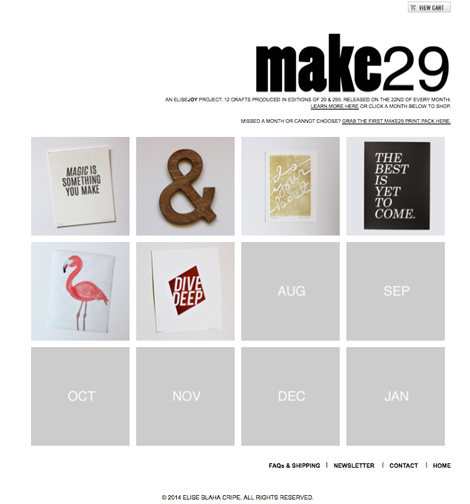
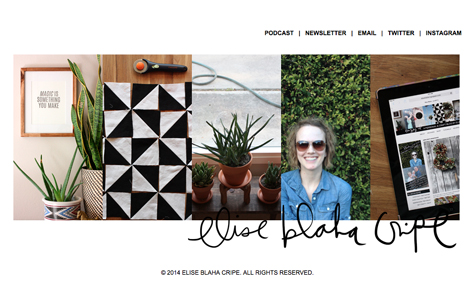
I use Typepad as a blog host (that is what you're reading now). And totally separate from that, I purchased a domain (elisejoy.com) and hosting (which allows me to actually put pages and images on my domain). I use Dreamweaver to design and code each page you see at elisejoy.com. My site is really VERY simple. (If you are a professional web-designer I imagine you think its PAINFULLY simple.) It's a home page (shown above) of 5 photo buttons and then some text links. I use it as a business landing page, a shop site and more recently to hold the episode guide and shownotes for the podcast.
Aboutpage

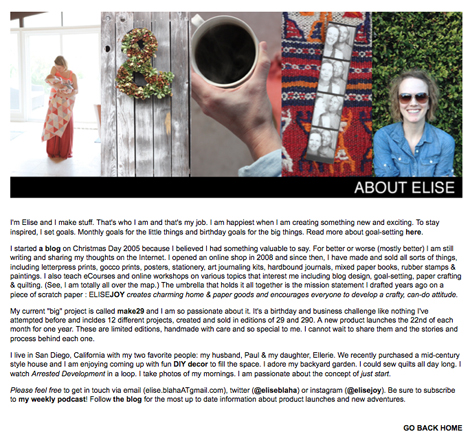
Most of the pages are super simple. A block of photos and then a paragraph of text with relevant links.
Make29page

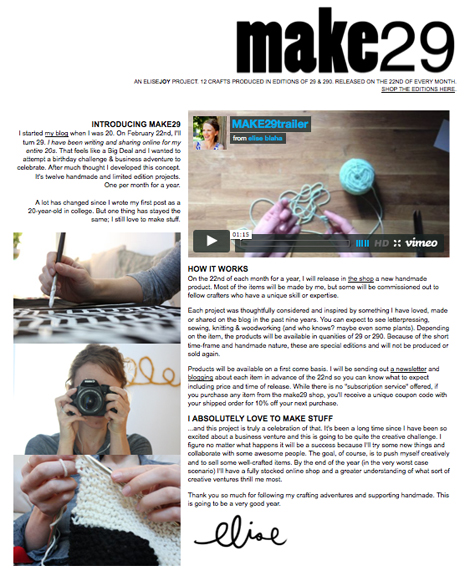
The MAKE29 page is a bit more interesting because I broke the format to create two columns of text, photos and the video trailer.
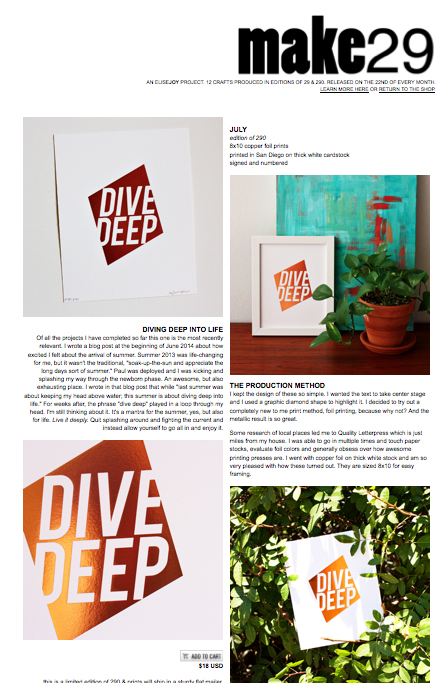
Shoppage

And the MAKE29 shop page (to me) looks exciting, but even that is just a grid of 12 photos that rollover as the year goes on. Each product page follows the same format – two columns of text and photos. I use e.junkie as my actual shopping cart system (which means those "buy now" and "view cart" buttons are created for me and among other things, inventory is tracked and addresses are collected).

Every single decision on my website was decided by answering two questions:

  1. what do I know how to do?
  2. what will look good?

I'm not interested in anything that looks good that I can't figure out how to make happen. And obviously I don't want anything that I can do that will not look good.

I share ALL of this to tell you one thing…the site is just the window display. It matters yes, but what matters MOST is making your awesome product available for your customers in a system that functions well. As an online shopper, I am not really concerned if a product is sold through Etsy or BigCartel or Shopify or a blog (I did that for awhile!) or Instagram or just a PayPal buy-now button.

What I am concerned about is that the product is exciting, that my payment is processed correctly and that the item arrives in good shape and looks like the image I saw online. There are SO MANY really great shopping cart systems that exist now – many of them that can give you the super minimal look that I was trying to find years ago when I decided to build my own shop pages.

Don't let the "where to sell" be your hang up. I recommend making a list of what you're looking for (ability to list 100 products, many different photo angles, various shipping options, functional search bar, minimal or flat-rate fees, sense of community) and then suggest doing some research into what is available that fits most of your needs. You don't have you use Etsy because that's what everyone used to do. You don't have to use Shopify because that's what everyone seems to be doing now. But one of those might be ideal for your sort of shop and your budget.

I'd love to answer any questions you have in the comments and please note, this post is NOT sponsored by or affilated with anyone (except for MAKE29, but let's be real: the whole blog – and my family – is sponsored by MAKE29).

Dottedline

This week on ELISE GETS CRAFTY, I'm chatting with Isabella of DearKate about running a (hugely!) sucessful kickstarter campaign. Subscribe on iTunes or stream the episode here.

Posted in

17 responses to “let’s talk shop.”

  1. Kelsey, Esp. Avatar

    Oh my gosh, this was posted at exactly the right time (for me)! I recently culled about 100 items from my closet and have been toying with the idea of hosting a little “Pop Up Shop My Closet” on my own blog, but have been totally lost as far as HOW to do it and what system to use. I’m all over this e-junkie page today.
    Thank you so much for sharing these tips. They’re oh-so very helpful. Fo’ reals.

    Like

  2. Katie Avatar
    Katie

    As always: great post! I have a completely different background, yet strangely your website coding advice still applies. What can I do (this would also include time-constraints and all) and then what looks good (or in my case what makes for a good and intersting read). By the way, THIS (the fact that what you write rings true no matter if you’re a crafter, an accountant, a scientist etc.) is what I love most about your blog! So thank you.

    Like

  3. Erika Avatar

    HTML 5 put frames out of style, and flash depends on who you ask (personally I can’t stand full flash sites, and CSS and jQuery have caught up in terms of functionality anyways), but whatever you’re doing looks awesome anyways 🙂

    Like

  4. Rachelle Avatar
    Rachelle

    Thanks for this post Elise! Weirdest thing but I was up until 1:00am last night trying to figure out what you use for your shopping cart system and then I wake up this morning to see this amazing post! Crazy how things work sometimes..

    Like

  5. Elise Avatar

    Thank yo! And very good to know. I could never get the hang of frames!

    Like

  6. Jess Avatar

    This is super helpful, thanks!

    Like

  7. Nat Avatar

    Who is your host? It’s something I’ve been meaning to do but I’m not sure how to actually go about finding a host and what is involved once I find one.

    Like

  8. Sarah Avatar

    I love love love that you use tables. Ha! I feel like these days even tables are out of style and you’re “supposed” to use CSS instead…but come on. Tables work, and they’re easy!
    I’m curious why you’ve never moved your blog under your own domain (i.e. elisejoy.com/blog)? I don’t use Typepad, so maybe that’s not an option?

    Like

  9. Casie Avatar

    Elise,
    This was my question too. Do you prefer to blog on typepad vs your own domain? I am starting a new blog with the hope of a tiny online shop next year and was wondering if one or the other is superior?

    Like

  10. elise blaha cripe Avatar

    I use godaddy.com. 🙂

    Like

  11. elise blaha cripe Avatar

    RIGHT? tables are the best.
    I WANT to get the blog it’s on domain and you can do that through typepad, it’s just not something I have done yet. SHould add it to the list. It’s probably something I’ll do when I order a new round of business cards. 🙂
    Right now, I find it easy to just send people to elisejoy.com and then they can get to the blog from there.

    Like

  12. elise blaha cripe Avatar

    I can set it up so I have a domain like elisejoyblog.com that directs to or is mapped to my typepad site. This is on my list of things to do.
    I have been on typepad since I started blogging and I like the customer service and the way the back side is set up. Right now, everything I want for my blog can be done with Typepad.
    Most people who are just now starting a blog seem to go right to wordpress.org and that’s great, but you need a bit more knowledge of HTML to get things looking good there.

    Like

  13. Nat Avatar

    And sorry if I wasn’t clear, but I meant the host for your domain, not the shop host.

    Like

  14. padni Avatar

    hi elise, i really love your post. i wanna ask, do you need to install like anti-hacking for your online shop? just like we used to do if we have wordpress.

    Like

  15. J3SS1C4 Avatar

    What a great post! I’m late to the web design party so I’m trying to teach myself to code with CSS since it seems to be the current thing. I love what you’ve done with your design, too 🙂

    Like

  16. Johanna Avatar

    Yay to teaching yourself HTML + CSS! As a professional web designer, I wholeheartedly encourage the use of HTML for content only & CSS for styling – it truly does make for a better web experience. Do you know the Mozilla Developer Network (https://developer.mozilla.org)? I use it all the time, as it offers an extensive HTML and CSS element reference.

    Like

  17. amanda dawn Avatar
    amanda dawn

    thanks for this podcast! just listened to it on my way to work & am about to launch a kickstarter sept 1! very helpful 🙂 (though i’m not banking on making our goal in 15 minutes! that’s insane!)

    Like

Leave a reply to elise blaha cripe Cancel reply