enJOY it

an archived personal and craft blog from Elise Blaha Cripe.

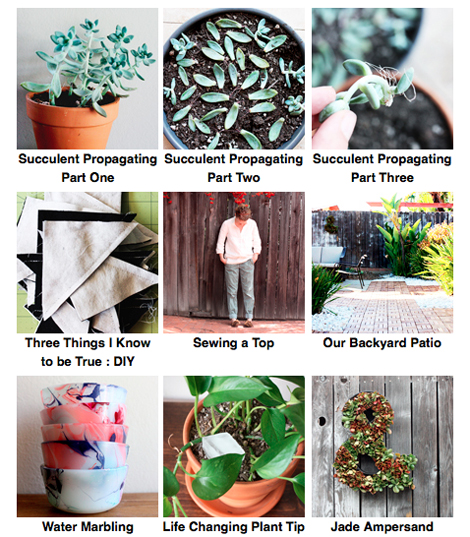
Screen shot 2014-07-15 at 10.31.29 AM

Spoiler Alert : This post will NOT tell you how to actually code archive pages for your blog. That is something that I teach in Blog Design Love 2.0, an ecourse that is available now. The course is $45 and worth every penny if you want to learn design principles (from graphic designer Promise Tangeman) and web coding for bloggers (from me). The course is tailored to Typepad, Blogger and WordPress.com BUT the archive pages lesson and design sections are applicable to any web platform.

Last week I started coding nine years of archives to make things easier to find. You can see my progress so far right here.

I have had "code archive pages" on my to-do list since August 2012 when I started working with ABM on Blog Design Love (version one). I saw their pages (here is one) and my eyes popped out of my head. "HOW EFFING RAD DO THOSE LOOK?!" I thought. "I NEED TO DO THAT." I thought.

But the tediousness (the code isn't hard, just detailed) and TIME that it would take to put something like that into effect would be intense. Of course, this is pre-baby when all I had was TIME. (Seriously, what on earth was I doing? Were my nails always painted? They must have been.)

Anyway.

I put it off. I put it off. I put it off.

And then, last week, I had a bit of a lull in my schedule. (July MAKE29 was already packed, blog posts were more or less prepared, podcast episodes were recorded and one can only practice their WDS speech so many times a day.) So I started cranking through it. I started with Monday's cold brew post and worked backwards. One. Post. At. A. Time.
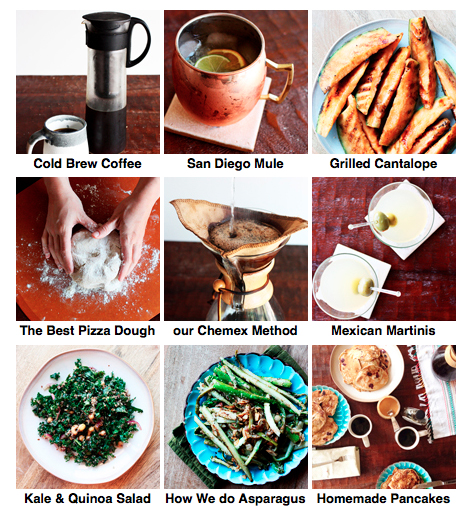
Screen shot 2014-07-15 at 10.32.27 AM

WHY? What's the point?

The point is I have an ABSURD amount of content on this blog. Some crap, for sure, but some really good stuff. Like print it out and frame it stuff. Some work that makes me feel exceptionally proud. Blogging can feel temporary. Even though what we write "exists" forever, it can really feel like you're only as good as your last re-pinned DIY. Or your last emotional post that got 50 comments. And that's garbage. While it's easy to feel that way, it's not true.

A blog, if you want it to be, is a body of work. I say this all the time but, THIS IS MY RESUME. It's my portfolio. It's my craft, trade and talent, in photos and words. And creating archive pages is like using a readable font on a resume – it won't make up for lack of content but it's very helpful to explain what you do.

In theory, having organized archives should increase my pageviews, but as discussed last month, since I am not selling adspace, pageviews are not my money maker. People buying my stuff is my money maker. People purchasing through affiliate links is my (less but still relevant) money maker.

Neither of those come from more pageviews. (They come from more visitors and/or more purchasing options.)
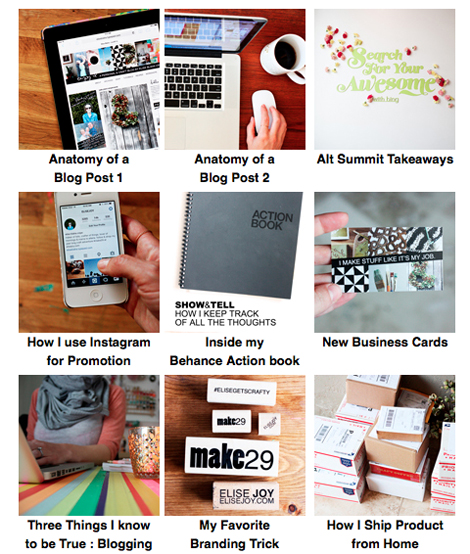
Screen shot 2014-07-15 at 10.32.08 AM

But getting things organized IS incentive to give older posts some interest (and pins, and tweets and shares and etc) which IS incentive to get more eyeballs on my products. And excellent and organized resources might help those random people who click through to stick around for longer than a salad recipe.

Getting organized also makes my job 100 times easier. (Less email. Less searching.) And your experience more pleasurable. (Less frustration. Less waiting. Less searching.)
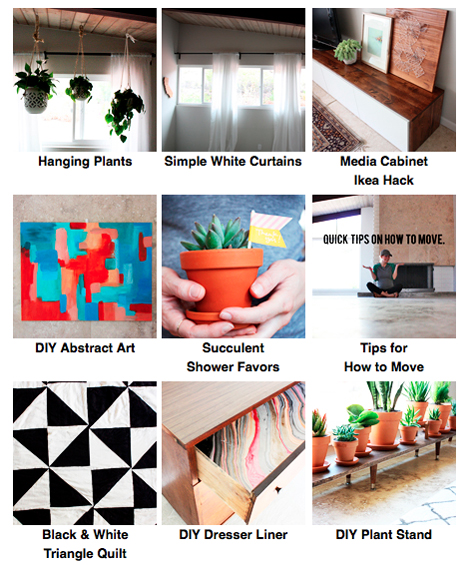
Screen shot 2014-07-15 at 10.31.47 AM

I didn't make an archive button every post. "Just" recipes, tutorials, fun projects, adventures / meaningful personal posts & business / blogging posts. Basically the highlights. The stuff I find myself thinking about or wanting to link to currently. The stuff that feels the most relevant to what I am doing now and where I want my content to continue to head. I will probably end up dividing these pages up a bit more by topic (there are already almost 200 posts to scroll through) but right now it's just about getting them done.

I am only through 2012, which means another 7 years to go. But I have a feeling there will be a lot less "archive button worthy" stuff back there.

When I look at this page I am about as happy as a blogger gets. MY WORK. MY STUFF. IN ORDER. It's like I've lined up these posts for battle. Only the battle is fun…so really, it's like I've lined up these posts for a really fancy organization party. For sure Leslie Knope will be there, just jammin' on her planner.

Dottedline

This week on ELISE GETS CRAFTY, I'm chatting MONEY in a small business discussion with Ann-Marie Espinoza. Subscribe on iTunes or stream the episode here.

Posted in

60 responses to “why I coded my archive pages.”

  1. andrea Avatar

    I took that Blog (Desing) Love class and after some hard work I started my blog on Monday. I learned so much (thanks for your awesome work by the way).
    One thing I was sure to start from the beginning is to highlight my archives and make them visible (as I also learned in the Blog Life class.) So far I only have 2 blog posts and 100% of them are visible in my archives πŸ™‚
    What you have to do takes really a big amount of time. The code itself isn’t difficult but it still takes time to replace the correct link and the correct small photo.
    I wish you strength to go through all your remaining seven years.
    And I already listened this weeks episode (the perks of already having 2pm) and I really like this one. But I’m especially looking forward to the episode, where you’ll talk about prizing your stuff.

    Like

  2. Kelsey, Esp. Avatar

    This looks SO GREAT, Elise. I’m such a baby to blogging — only a year or two opposed to nearly a decade — but I’ve already found myself completely overwhelmed with setting up a visual archive for selected posts/categories.
    A big kudos to you for sitting down and getting this done…errr, working to get it done. It looks so great so far, AND has come in handy a number of times for me as I’m searching for past content to share πŸ™‚

    Like

  3. Aimee Avatar

    Lol, “shatting” with Ann-Marie. I know it’s totally unintentional and I’ve some rippers in posts too but that spelling mistake really does crack me up.

    Like

  4. Marian Avatar

    This looks really nice. Sometimes I think back to certain blogs I read and am like, “Ooh, I’d really like the _____ recipe they did” and this makes it so helpful. πŸ™‚ Hope the rest of your coding goes smoothly!

    Like

  5. J3SS1C4 Avatar

    I love how your archives are turning out! I’ve been reading your blog for about 2-3 years now, and this makes it much easier to find the older posts that I want to look at again. I’ve been meaning to get myself organised to do this for my blog (only a little over 2 years in my case) ever since I purchased the original Blog (Design) Love class. I’m hoping to get the new one on payday next week as incentive to get some more work done!

    Like

  6. Aimee Avatar

    I think it’s twice as funny because it’s “shatting MONEY” πŸ™‚

    Like

  7. Anna Avatar

    The archives look so great, Elise! I’ve been enjoying rediscovering old favorites. I’d be curious to know how you differentiate the new archive page, the “I Write About” sidebar, and the tags at the bottom of each post – all of which are fun to click through. I imagine they each serve a different purpose, or organize posts in different ways – just something I’m curious about as I think about sprucing up my own blog.

    Like

  8. Kate Avatar
    Kate

    Me too! I also LOL’d

    Like

  9. Martina Avatar

    I don’t know Elise I’ve read your blog start to finish and there are some gems of posts way back in the archives!! It’s great to see them pop up again πŸ™‚

    Like

  10. Emily Avatar
    Emily

    the archives look AWESOME. Even as an avid reader, I have already found myself going back to your newly-organized archives and re-reading some of my favorite posts. Great work!!!
    (Although – I must say, I was dying to hear about WDS part II this morning – LOL! How about another post today??!! πŸ˜‰

    Like

  11. Marina H. Avatar

    Just a UI suggestion, but it might be helpful to have a list of the categories as anchor links across the top. Less scrolling for those who already have a destination in mind. Looks great!

    Like

  12. elise blaha cripe Avatar

    FIXED THAT! embarrassing!! πŸ˜‰

    Like

  13. NatΓ‘lie Avatar
    NatΓ‘lie

    The archives are impressive! So helpful for readers like me!:) Thumbs up! n.

    Like

  14. elise blaha cripe Avatar

    thank you! and yes! I am going to change the sidebar and all nav bar buttons as well… that’s on the list. πŸ™‚

    Like

  15. elise blaha cripe Avatar

    gems for sure…we’ll see what happens!

    Like

  16. elise blaha cripe Avatar

    it’s coming. I can’t share the whole thing until the speech is live so it will be space out a bit. πŸ™‚

    Like

  17. elise blaha cripe Avatar

    yes! Am thinking about that. Great idea.

    Like

  18. Amanda - Small Home Big Start Avatar

    Great post! I loved going back through you archives and seeing posts I may have missed or some that I wanted to revisit again.
    I took the time to re-organize my archives last month and it’s been great to see how much interest some of my older posts are getting. As bloggers, we put so much of ourselves out there and it’s nice to see older posts I put so much love and hard work into getting some feedback now.

    Like

  19. Leah Avatar

    Yes me too!! It’s an adorable typo. πŸ™‚

    Like

  20. trish Avatar

    THIS is fabulous. Absolutely awesome to search for topics like this. A lot of hard work but I think so worth it. Give yourself a pat on the back…it looks great. I love how they fall into categories.

    Like

  21. angela ezzell Avatar

    Hi Elise! The archives look rad!
    I’m curious – what’s the difference between the new photo archives, the search button, and the sidebar links? I’m assuming they’ll all get you to the same place eventually, but the new photo archives are more user-friendly? Thanks!

    Like

  22. Emily Dismukes Avatar

    I love archives that are set up like yours! It makes it so easy to find things when there are photos included, because I usually remember what a project looked like as opposed to what a blogger called it. I really need to figure out how to code my own archives like this. I switched to a new blog recently so if I start now (while I don’t have many posts to go through), I might actually have a chance of getting it done…haha. Good job on this project!

    Like

  23. elise blaha cripe Avatar

    great question! if you search for something like say “fitbit” sometimes you don’t get the actual post, it randomly pulls posts where “fitbit” is mentioned in the comments. Or if you look for something like “pregnancy faves” you get a bunch of posts were I mentioned pregnancy, but not the actual post about what I liked during my pregnancy.
    On the sidebar links, you just get a link to the category. So you see ALLLLLLL the recipe posts, but might have to scroll back PAGES to find that one cocktail you were looking for.
    The archive page takes the searching out of the equation and you get to just find that one post your were looking for. OR, if you were not looking for a particular post, just wanting an idea for a DIY project, you can see all the “options” in just a few seconds.
    πŸ™‚

    Like

  24. Lauren Avatar

    Yayy!! Sometimes I just come to your blog and click back to as many old posts as I can looking for content I haven’t read before. I already see waaaaaaaaay more things that I didn’t stumble on! Bills got a bit out of hand this month but next month I am GETTING Blog Lovin 2.0!!

    Like

  25. angela ezzell Avatar

    Awesome, thanks!

    Like

  26. Love, Carrie Avatar

    I was on your blog last week looking for a specific post and had the hardest time finding it without the search tool option (it’s not something you’ll most likely add to your “archives” page). Do you have plans to add it back in for those of us who like to reference your more obscure posts?

    Like

  27. Melissa Marie Avatar

    I love the new archives! Did you edit the archive pictures with Photoshop? Also the podcast was great I love listening to you & Ann Marie!

    Like

  28. Amanda Avatar

    Hi Elise!
    When I was reading Anna’s comment, I got that she was wondering how you decided how to sort the categories? Like, how to decide what posts go into what categories? But maybe that’s just because I’m wondering that? As dorky as this might sound, I’ve loved the categories you use, like “e&p”, “adventures”, “small business,” etc. How do you come up with categories/decide which categories to assign to posts, as a post can fall under a lot of different categories?
    P.S. I’m probably making this much more difficult than it needs to be, I just love organization and agonize over things like categories and category names haha

    Like

  29. elise blaha cripe Avatar

    great question.
    part of it is that if I agonized, this would never get done. I have 3000 posts to go through. no time for that. πŸ˜‰
    so it’s just general. like e&p is adventures. military life is adventures. motherhood stuff is adventures.
    sewing is diy. paper is paper projects. what i am eating with gd is food.
    These post will all still be categorized by whatever I filed them under originally AND they will be searchable through thumbnails.
    πŸ™‚

    Like

  30. elise blaha cripe Avatar

    which post is it?
    the search tool is not going away, it will always be on the sidebar. It’s still there right now. πŸ™‚

    Like

  31. Anna Avatar

    If I’m looking for a specific post, I usually do it through Google -“search:eliseblaha.typepad.com [fitbit, pizza dough, script art, etc.]” It might be a little clunky, but Google almost always turns up the right post.

    Like

  32. Kelsey Avatar

    This is so inspiring, great work! This is on my to-do list and knowing that you cover it in the e-course is motivating me to buy it. I so appreciate you sharing your knowledge and teaching. As you said, it feels like I don’t have time with a toddler and #2 on the way but surely life will not be giving my any more time soon, right? So seize the day! Thanks for the inspiration!

    Like

  33. karin hope Avatar
    karin hope

    I was thinking the same thing, and a “back to top” link at the end of each section.
    Also, I would love it if each podcast had a forum or something to go with it. Every episode makes me think and I end up with so many comments and questions and nowhere to share them. It seems like such a great opportunity for your readers to have community with one another and all share our thoughts and strengths with one another!

    Like

  34. alli cherry Avatar

    THIS IS SO GOOD. That is all πŸ™‚

    Like

  35. Jen Avatar
    Jen

    I discovered this a few days ago while looking for your posts on blogging and social media. I didn’t know it was new but thought it was a great way to organize your archives!

    Like

  36. Welcome Home Taylor Avatar

    I adore the new archive pages! I think they’re absolutely fantastic and so easy to find a post. I’ve already used it twice when thinking, “what was that post when Elise talked about that thing?” I pretty much found both posts in the snap of a finger! Also, one of my favorite P&R episodes is when Leslie Knope is making her online dating profile because she basically described everything I like (“I think you just described The Phantom of the Opera…”) haha!
    xoxo
    Taylor

    Like

  37. Michelle Avatar

    So basically it’s an entire blog post explaining what librarians do and why it’s important.
    You didn’t need to tell ME. I’m glad you explained it for people who think large amounts of information doesn’t need to be organized as long as there is a search bar available. (It does)
    Also– the task of coding and organizing all your 9 years of archives does not sound tedious to me. It sounds like the most fun ever.
    I love your picture archives.
    Michelle, MLIS

    Like

  38. Mel Avatar

    WOW WOW WOW.
    You should be happy and also proud to see that huge body of work. I’ve read here for a while but already have clicked back to read posts again.
    Excellent job so far.

    Like

  39. elise blaha cripe Avatar

    yeah…running a forum is NOT something I can add to my plate in the near future. I love the idea, but can’t even begin to think about it.
    but the #elisegetscrafty might be a decent place to share thoughts on ig or twitter. πŸ™‚

    Like

  40. Michelle Avatar

    PS. I don’t suppose you’d consider including a button for posts like
    Young Elise
    Elise Gets Funny
    or something?
    Bc man, I LOVE the posts like where you duct taped the spider! Or when you claim that your boyfriend is secretly Superman. Those were AWESOME.

    Like

  41. elise blaha cripe Avatar

    that is THE BEST sequence of tv, maybe ever.

    Like

  42. elise blaha cripe Avatar

    great idea. I’ll make an “oldies, but goodies” section when I get to those years.

    Like

  43. Michelle Avatar

    I love different ways of organizing information and all the reasons why.
    LOVE LOVE LOOOOOOOVVVEEEE this

    Like

  44. hannah Avatar

    Perfect explanation! I love this project but I couldn’t for the life of me think of a reason it’d be a good idea. Thanks for that!

    Like

  45. Joanna K Avatar
    Joanna K

    I love this Ellise! Its like a pinterest of just your stuff, which is super awesome πŸ™‚

    Like

  46. Carrie Anderson Avatar
    Carrie Anderson

    HA! now I am anxiously awaiting the oldies but goodies category!!
    stay brilliant lady πŸ™‚ πŸ™‚

    Like

  47. RusticChicMama Avatar

    I love the new archives! I’m signing up for Blog Design Love. πŸ™‚ I love listening to your podcast too – even though I’m not currently running my own business, I’m learning so much.

    Like

  48. kelsey Avatar

    Great post, as always! I’ve been working on my archives over the past few months as well, but for whatever reasons I’ve made them into different pages by category. It’s not for everybody, but Squarespace has made this INCREDIBLY easy. All of these pages took me less than a minute to make (if you’ve categorized things correctly in the past, the images/text all appear automatically, and the date if you want it) and it would be a snap to put them all on one page if I change my mind. If there are any other Squarespace users out there, you just create a new Page and add a Summary. I especially love looking at all my past outfits all in one place!
    Pregnancy Week-by-Week: http://www.snappycasualblog.com/pregnancy-updates/
    Roonney Month-by-Month: http://www.snappycasualblog.com/monthly-baby-updates/
    Recipes: http://www.snappycasualblog.com/recipes
    Outfits: http://www.snappycasualblog.com/outfits

    Like

Leave a reply to NatΓ‘lie Cancel reply