enJOY it

an archived personal and craft blog from Elise Blaha Cripe.

Plwk40

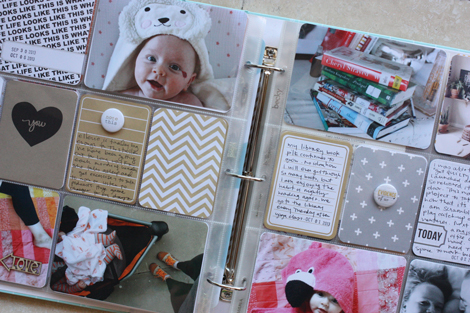
It’s week 40 and yes, I love this project.

I actually got a question about this the other week… do I really still LOVE putting together the spreads. The answer is yes and no. I LOVE tucking all the pieces into place. I love taking pictures. I love doing the embellishing and the journaling. I hate printing the photos – that’s my least favorite part and biggest hold up every week. If I could snap my fingers and the photos would appear, I would be obsessed all over again. This means I am going to have to figure out a new photo printing method for 2014. Stay tuned.
Plwk40full
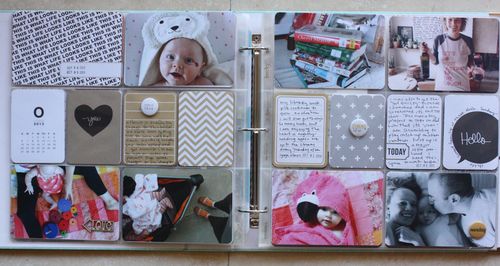
click the photo to enlarge for a somewhat clearer image.

Weeks of : September 30 – October 6.
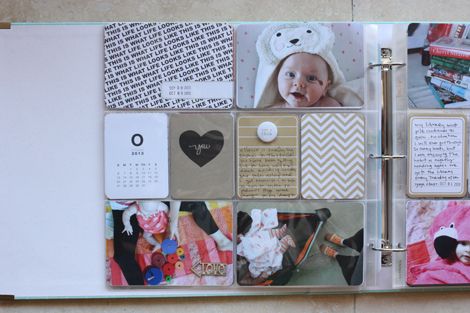
Plwk40left

What happened this week? We were home. Nothing special and not too many photos since I was working to get the eCourse out the door.
Plwk40detail

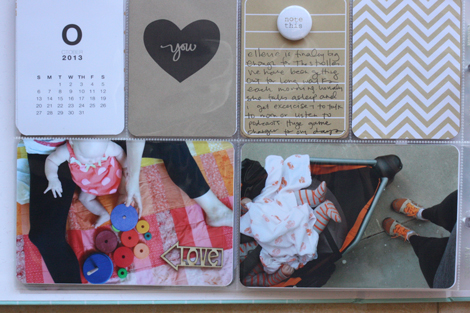
Anything special in the spread? Those two bottom photos were actually taken the following week. But since I decided to dedicate week 41 to our Catalina trip and I had so few photos I went with it.
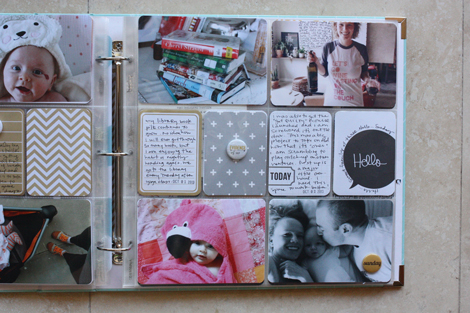
Plwk40right

Techniques this week : I have been using more 3×4 journaling and embellishment cards these weeks because I am so annoyed with printing photos. It’s sort of a win/win because it’s less printing AND I get to use up some of the fun cards in my stash.

Plwk40detail2

Overall thoughts : It was not intentional that I had two photos of E in various animal bath towels, but they were both so great I had to use them.

Ratio of iPhone photos to “real camera” photos : 5 to 2.

Ratio of photos taken by Elise to photos taken by Paul : All Elise.

Supplies used : Seafoam core kit, Midnight core kit, Freckled Fawn wood chip arrow, Mer Carty journaling card, Evalicious badge, Paislee Press calendar card and you card.

Tools used : Design A pocket pages, Fiskars corner rounder, Zig Millenium pen, Rotatrim paper trimmer, Office Depot date stamp, staz-on ink. All photos were printed at home on my HP Photosmart 2575 printer on Office Depot semi-gloss photo paper.

Project Life is a memory-keeping system created by Becky Higgins. I use photos, text and stuff to document our life weekly. You can see all the posts from 2012 here and 2013 here. Do you have a question about how I am tackling this project (including anything about the photos)? Check here.

Posted in

27 responses to “project life 2013 : week 40.”

  1. Giada Avatar
    Giada

    I can’t wait to discover more about what you come up with for 2014. Seriously, I can’t wait! Will you be doing December Daily too this year? 🙂

    Like

  2. Marina D-K Avatar
    Marina D-K

    Printing the photos is my least favorite part too. Please let us know if you somehow develop the magical printing system 😉

    Like

  3. Tracy Avatar
    Tracy

    I hated printing photos too and I got tired of big bulky albums that didn’t fit anywhere-so I went digi two years ago and haven’t looked back! I sometimes miss the physical goodness of the little card boxes and the textures of the paper, but digi fits in to my life so much better!

    Like

  4. elise blaha Avatar

    Sort of! I am contributing to a December album class with Big Picture (see right sidebar link) and so my holiday book will be part of that. (I think. :))

    Like

  5. elise blaha Avatar

    I can totally see the appeal!! I love the paper part too much right now to give it up though.

    Like

  6. Melissa H Avatar

    Printing photos is why I haven’t and probably won’t do PL. I don’t have a photo printer and don’t want to pay shipping it run to Costco every week. Although now that I think about it maybe mail order is the way to go. Monthly rather than weekly.

    Like

  7. kelly Avatar

    ugh the photo printing…sometimes i really miss the old days of film. i’ve printed at home, at walgreens, at shutterfly…still trying to come up a faster workflow. looking forward to seeing how you solve this problem.

    Like

  8. tracyxo Avatar
    tracyxo

    Ah, printing the photos! Totally understand! Have you considered a Canon Selphy? Mine is the reason why I have been up to date all year AND why my love for PL stays strong!

    Like

  9. Shereen Avatar
    Shereen

    I love seeing your project life pages. I have a question, not a negative one, just curious. I see lots of Ellerie and lots of you (only natural, you’re the one putting it together) but I was wondering why not more Paul? You know, so in 10 years when Ellerie looks back she can see what daddy was doing, reading, wearing… Maybe it’s just not something you want to share here, I totally get that, but was just my tiny observation.

    Like

  10. Ffion Avatar

    I’ll bet the printing isn’t that much fun 😦
    Hope you figure out how to make your life easier there.
    I’m very curious to hear more about those calendars from your “around here” post…. 🙂 New shop item? Or just for fun?
    Get a 5$ Monster at http://fiverr.com/ffionevans/draw-an-ugly-creature-monster-or-beast

    Like

  11. Shir Benovich Avatar

    Looking forward to read about your new printing method, whenever you come up with one.. Hate it.
    I intend to print pictures in local printing/camera shop – but hate the idea of chasing others on a weekly basis 😦

    Like

  12. Renate Avatar
    Renate

    I hated the printing too. I bought a Selphy and I didn’t liked it – the printed pictures were just a little smaller than 4×6. A couple of weeks ago I bought a Canon Pixma ip7250 wlan printer and I love this printer. There is a Canon app for the iPhone available and you can super easy print your pictures from your phone from everywhere in the house. My DSLR pictures get printed from my macbook without the annoying cable while I laying on the couch. You should also think about a WLAN printer 🙂

    Like

  13. Teresa Avatar

    Hi Elise! Love your spread this week. Little Ellerie is growing up so quickly already!
    On the printing front…how do you organize your photos? Have you considered Lightroom? It has a print module that makes it so much easier for to print. You can create templates for different photo sizes and LR will put the photos you choose into the template, export, and print! (Or send to your fave printer). I can’t imagine PL without LR anymore! 🙂 Hope you find your printing sweet spot!

    Like

  14. Jeni Avatar
    Jeni

    Printing photos IS the worst part! But I’ve gotten in the routine of uploading them on Sunday and then my husband picks them up on his way home from work on Monday. I put together my spread that evening after our girls go to bed and it’s a great thing to look forward to on a Monday! My only issue is the quality of Walgreen’s photos but I can’t imagine paying for shipping even on a monthly basis…
    Am I rambling? Yep. Anyway, I enjoy your weekend update. Puts me in the PL mood. 🙂

    Like

  15. Katie Stilwater Avatar

    There’s nothing better than a fresh from the tubby baby wrapped in an oversize animal towel! Such CUTE pics!

    Like

  16. Olga Avatar
    Olga

    I was just talking about this to a friend of mine… printing photos was the thing that stopped me in my tracks when I tried to do PL…

    Like

  17. Mindy Avatar
    Mindy

    is it the actual printing or trying to decide which size to print for the layout space? i always have a hard time trying to decide what size to print. is that why you mentioned maybe going with just the 3×4 format, then you don’t have to decide which size!

    Like

  18. Elsa-Maija Avatar

    Printing is my favorite part, because it’s the fastest part. I just go through my photos in iPhoto, export them to my print folder and then print with printers software (Easy Photo-Print EX). I’m using Canon Pixma (it’s 3 or 4 years old) and I can choose the number (1,2,4,6 or 8) of pictures in 15x10cm (4×6) paper. So those 4×3’s are easy to print. No photoshoping 🙂

    Like

  19. Alida Avatar
    Alida

    Love your page and all the journaling cards. So looking forward to using Seafoam next year. I print at a photo place. It’s close to my husband’s work, so he does that run for me. I enjoy the weekly selection and compiling of the file that goes to print. So never thought of the process as negative. What I least enjoy is when I see everything together and it doesn’t work/is too busy/crazy.

    Like

  20. Grace Avatar
    Grace

    I always adore seeing your PL spreads – you are the one who inspired me to start this year and it’s been WONDERFUL documenting our lives. Have you ever tried the Walgreens phone app? Since you take the majority of photos on your iPhone, it may be something to try…it’s the only thing that has enabled me to keep up with it. I just go through the camera roll on my phone, click on the ones I want printed to Walgreens, and then they print within an hour. I can pick them up whenever I’m out and about. Granted, you couldn’t do some of the more custom sizes that you do sometimes but for the average week it may work for you! Thank you for sharing your lives with all of us!

    Like

  21. Jen Tapler Avatar

    Printing is my least favorite part as well. I’ve been researching a Canon Selphy or something similar, but my problem is that I still need to do a bit of editing before printing, so I’m not sure that would really save me that much time in the end anyway. I think printing at home will always be my choice as I want to have the convenience of sitting down, choosing the photos, editing them, printing them, and then finishing up my layout all at once (and not having to wait for photos). Also, living on Maui I don’t have decent local options so shipping would be required. Possibly with better planning in 2014, I can order 2 weeks worth of prints at the time I’m putting together the previous 2 weeks’ layouts? I’m not sure yet, but this has been on my mind quite a bit lately as well.

    Like

  22. Marissa Avatar

    I love love love your weekly layouts. Again, adding Ellerie to the mix, they seem so much more complete 🙂
    Because I’m a “newbie” (and I suck at journaling, getting better though), I’ve done EVERYTHING with my iPhone except take pictures (well, some are from my iPhone but most are from my Canon Rebel T3i). I upload my photos to my phone, I use PicFrame to create my 3×4 pictures, Snapseed to edit, Rhonna for embellishments, Phonto for fonts, and Red Stamp for my This Week cards. Then I do a weekly visit to Walgreens (because I like mine matted and they only do online pickups for glossy) and within 15 min, my photos are ready. If visiting a local drug store is in your schedule, I’d upload them online and pick them up when you’re on the road 😉
    I get that looking at your tiny phone instead of a 18″ computer might get annoying.. Maybe I’ll have a different method for 2014 as well 🙂
    Thank you for always being creatively inspiring!

    Like

  23. Tara Avatar
    Tara

    I totally agree!1 I can’t wait to see how you print your photos next year!! It is why I am struggling keeping up!! Love your layouts and your Seafoam edition was my first PL!! Thanks so much for being so awesome!

    Like

  24. J3SS1C4 Avatar

    Printing the pictures is always the worst part… I’ve always struggled with that for all of the projects that I do… It’s the biggest stumbling block that I have for finishing any projects lately… I so need to get better at it!

    Like

  25. Lindsey Avatar

    Love your PL spreads!
    One thing that has helped me with printing pictures is using Target’s Kodak app! All I have to do is pick my pictures from my phone and send them directly to my local Target. I am at Target weekly anyway so I pick them up and get my errands done 🙂 For 3×4 pictures, I just use my Diptic app that allows you to put pictures side by side. When I upload to Target both pictures come out on the 4×6 paper…perfect 3×4 cards! No shipping and no hassle (as long as you have a Target by you!). I am pretty sure the people that work there know me by name now 🙂 Of course, if you start using your fancy camera more often, this may not be as easy.
    Have a great weekend!

    Like

  26. Chrystina Avatar

    Dear Paul, you’re going to have to step up your photo taking game. 🙂

    Like

  27. Gayle Avatar

    I totally agree about the photo printing issue. I’m so in love with the quality of photos and size options from Persnickity Prints but their website is not easy to use, plus I have to wait for photos and pay for shipping. But then, is it worth doing if your photos won’t last? I’d love to hear what solution you come up with!

    Like

Leave a reply to Grace Cancel reply