enJOY it

an archived personal and craft blog from Elise Blaha Cripe.

Selfportaits

I'm a big fan of taking self-portraits. In my house, I am the main photographer. Paul is kind enough to be in photos and happy enough to take them for me, but "oh we should take a photo!" is not an expression that's ever come out of his mouth. Plus, with him deploying often, if I want a photo of me for the blog or our project life album, I have to take it myself.

So for the past few years, I have been "practicing" and doing just that. Below are some of my favorite simple tips.

Takeabunch

Take a ton. The best part about taking your own photos is the only person who gets bored is you. When Paul's taking photos for me, I feel bad asking him to keep taking them or being picky about how things are looking. I'm just grateful for the help so I don't want to push my luck. But when I'm on my own, I can take more and not feel like I'm wasting someone else's time. I look at the camera and tweak things as I go until I have that perfect shot. (Surprisingly, when I look back at a group of photos, often it's the third out of ten shots that wins, but at least I have choices.)
Armout
Armout2

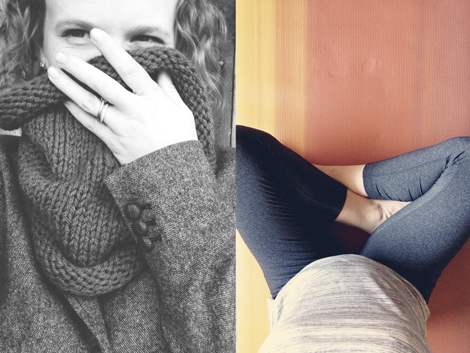
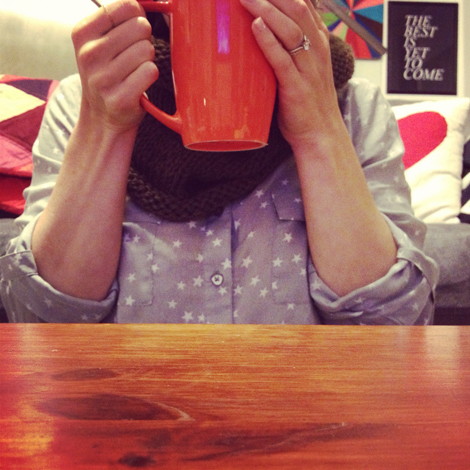
Try the "hand reaching out method." You know this one. Hold the camera in front (or above) your body and snap. Sometimes it's perfect. Sometimes it takes more than a few tries. The trick is to keep your reaching arm out of the shot. It's also important to pay attention to the light source. If it's right in front of you, or right above you, you'll get an incredibly awkward "camera-shadow." I like this method a lot if I don't care that both of my hands are in the shot. It's easy to work with since I don't need to mess with a timer or remote.

Ps13
Timer

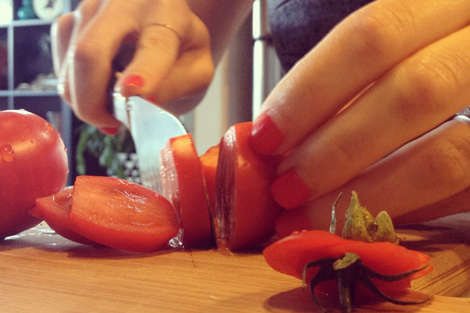
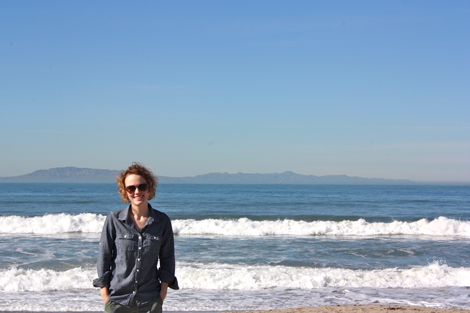
Use a timer. But my favorite method is to use a timer. With the timer, I can capture more natural "real-life action shots." I love to get my hands at work (or recently, fun yoga poses.) When I am using my iPhone (and that's often), I use the TimerCam app set to either 5 or 10 seconds. With my big camera, I used to use the timer setting, but I recently purchased a wireless camera remote that is pretty rad because it focuses for me. I have found that the few second delay between when I hit the timer button and when the shutter closes gives me enough time to "hide" the remote to it's not obvious that I snapped the shot. The photos in this post and this post were both taken by me with the camera remote.
Flat
Elisemore

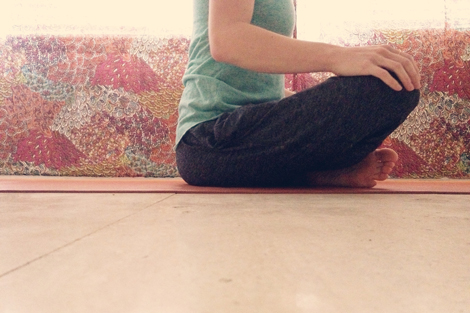
Use a flat surface. It should got without saying, but always rest your camera on a flat surface. Often, for my yoga shots, this means setting my iPhone right on the ground. My phone and case rest just fine on the long side so I don't have to use anything to prop it up. I also love the look I get when I set my phone on a table or counter – it's normally ideal for "hand" shots. When I want the camera or phone higher, I usually just build my own tripod. Sometimes this means a stack of books. Sometimes this means a chair on top of our coffee table. Sometimes this means resting the camera on a lifegaurd stand and running a few yards to pose for the shot. Anything can be a tripod, it just needs to be flat.
Trust2

Trust your camera. What I have been most impressed with since I started taking more self-portrait timer shots is how awesome the camera seems to crop when I am not trying. It's helped me realize that a closer-cropped image can be cooler than a full shot.
TRUST

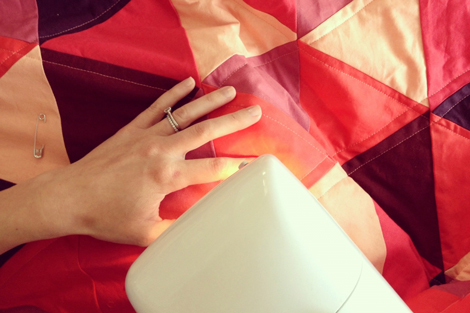
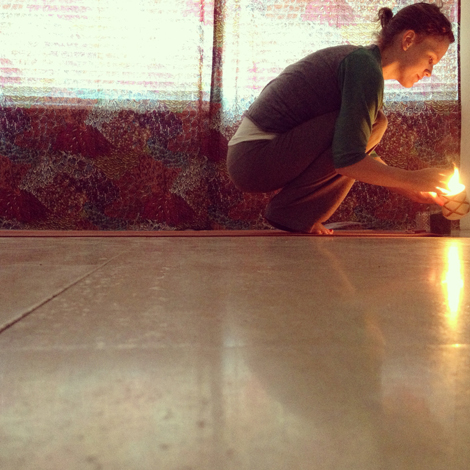
The timer needs to be trusted too. When I plan shots and look through the viewfinder, I often lose some of the magic that comes with just setting my camera down and hoping for the best. In the above shot, I had set up my camera and was just "test" shooting to see how much of the mat was in the frame. I lit candles while the camera did it's thing and was thrilled to find the resulting photo (and the reflection) that was caught on accident. Counting "1-2-3" then snapping the shutter guarantees a grinning subject. Hitting 5 seconds on a timer and letting go can result in a completely different image and I love that.
CROP1
CROP
CROP3

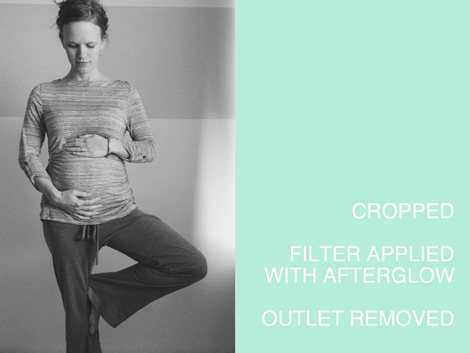
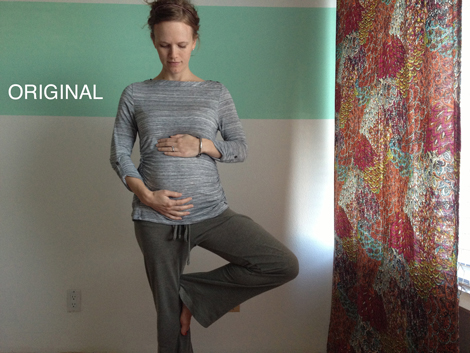
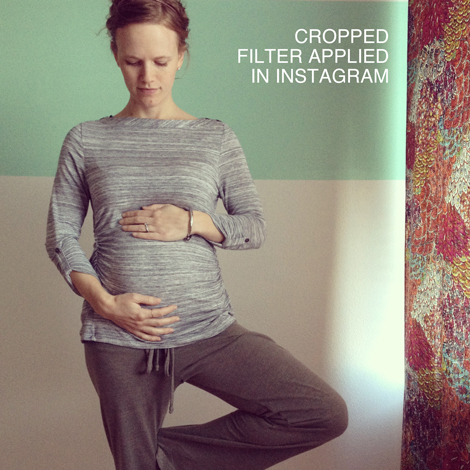
Snap now, crop later. So yes, this is an opposite tip of "trust your camera" but what's rad about timer shots is that once you have The Shot, you can always prefect it later with cropping. Above is a sample of a photo I love taken last week. In it's original form it's a bit cluttered but I love how it looks both cropped for instagram and cropped as a vertical 4×6. Cropping can turn a decent photo into something awesome and alleviates the fear of having to set up the perfect shot right from the beginning.

Unplug

Check the background. This goes for every single photo, self-portrait or not, but take a look at what's behind you. Sometimes this means just scooting a mess out of the way. Sometimes this means stepping in front of a cool wall or scene. Sometimes this just means making sure there is no power chord in the way. I don't worry about perfection, but there are always tiny things you can do – move a bit to the left, remove a pile of clothes, etc. – that result in a better shot.

related reading : simple tips for everyday photos.

Posted in

57 responses to “simple tips for self-portraits.”

  1. Amanda Avatar

    Thanks for the tips, Elise! I always admire your photos! I had no idea the photo of you with your cowl was a self-portrait! I assumed Paul had taken it for you.

    Like

  2. Karina K Avatar
    Karina K

    Thanks for the great tips! I really love the pictures from using the Timer App on my iPhone.

    Like

  3. Sabine Avatar

    Thank you so much for sharing these tips with us. Love your self-portraits so much and always wondered how you get there. Thanks! 🙂

    Like

  4. christie elkins Avatar

    Awesome tips! I just did a few self-pics on a “what I wore Wednesday” post and these tips are a tremendous help! Thank you!

    Like

  5. Diana Avatar

    I found this really helpful! Thanks for the great tips!
    xo
    Diana
    http://unusuallylovely.com

    Like

  6. Jenn Avatar

    great tips! The Camera+ app also has a timer that I have used a lot. It also has built in filters. I love self-portraits 🙂

    Like

  7. Vic Avatar

    I’ve been on the hunt for a post like this for ages! Looking back through our family pictures over the past few years I was surprised to realised how little of me are in there! So I’m trying to take more of myself – this is super helpful – thanks!!

    Like

  8. chloe Avatar

    Great tips! I ask my boyfriend to take photos for me a lot and man he getes bored quickly!! Photographs are super important for a blog and its tough getting it right!

    Like

  9. -Michelle Avatar

    I think you forgot the most important thing – a photogenic model is a must!
    I only have 2-3 poses I can use where I don’t look like a giant cow.

    Like

  10. Fiona Avatar

    Great tips. Sometimes I like self portraits the best. It seems like I’m more comfortable taking my own picture than having someone else take it and I relax more. I also know that my husband doesn’t have much patience for taking photos and I get a bit stressed. I love seeing the variety of self portraits you’ve taken!

    Like

  11. emily hassman Avatar

    Great tips, Elise! I’m going to try a self-portrait during my yoga practice tonight. Didn’t go so well when I tried yesterday but today I’ll be armed with awesome tips!

    Like

  12. marta Avatar

    i love your self-portraits, elise. they always inspire me to get in front of the camera more. and oh! how cute that baby belly is. enjoy rubbing it for good luck.

    Like

  13. elise blaha Avatar

    I totally get this. I am the same way.

    Like

  14. Sara Avatar

    Really great post! My hunnie works an opposite schedule as me, so it is a very rare occasion (such as a Monday-holiday like MLK Day) that we actually get to spend time together. The last thing I want to do is bug him to take a bunch of pictures of us doing something fun. I’m so thankful for our camera timer, which has helped to capture some great shots of us on hikes and such.

    Like

  15. Lauren Burkitt Avatar

    Thank you so much for sharing. I love your photos and I can’t wait to try my own with your tips 🙂 Awesome post!
    Sending smiles,
    Lauren.

    Like

  16. rachel swartley Avatar

    I just got the TimerCam app a couple days ago — actually, in the middle of the night while I was feeding my baby. Haha. 🙂 I’m starting Project Life this year, and I’m determined to have photos of myself in the album! It always feels awkward to ask someone else in my family to take my photo, so I’m hoping to take some self portraits. Thanks for the tips!

    Like

  17. Jay Avatar

    These are really great tips.
    I got a gorillapod for Christmas and have been meaning to try it out but I think I want to invest in the remote as well!
    Thanks!

    Like

  18. Catherine Denton Avatar

    These are great ideas! I love that accidental shot of you lighting the candles.
    Catherine Denton

    Like

  19. Alyssa Avatar

    I love these tips!
    I always find myself behind the camera, and realized that most other people don’t even think about taking photos as much as I do. So if I want a photo of myself, it’s left up to me to take it!
    Gotta be creative with it!!

    Like

  20. Jen P Avatar
    Jen P

    I am having trouble with the TimerCam app. The first few shots work and they are saved in my camera, then it appears to take the picture but it is not saved anywhere (or at least I can’t find it anywhere on my phone). Have you ever had this happen?? Can’t figure out what I am doing wrong. Thanks. Love the post.

    Like

  21. Lauren Hooper Avatar

    Thanks for sharing these tips! I definately need to be less controlling with my timer photos! I am a new reader and I am really enjoying all your great posts on photo tips. Thanks!
    Lauren

    Like

  22. elise blaha Avatar

    I have not! Did you see if it needs an upgrade? Mine have always saved… e

    Like

  23. Caroline Avatar
    Caroline

    This post is so awesome and very very much what I can relate to!
    I take alot of self-shots and I hate it when my hand that holds the camera comes into the picture!
    it takes alot of practice and time, but it’s all fun!
    i’m so glad to know i’m not alone! hehe!!

    Like

  24. Giulia Avatar

    this post is so great, elise!

    Like

  25. Chick Tyler Avatar

    All wonderful tips! I definitely do the hand out method!

    Like

  26. desiree Avatar

    great tips 🙂

    Like

  27. Karen Avatar
    Karen

    Thanks for these great tips – this is my first year of Project Life as I am single and I need to get better at taking self portraits as I am trying to have at least one shot of myself per week in my project life.

    Like

  28. Becky H Avatar
    Becky H

    Elise, thank you so much. I got TimerCam after your BPC Chat and I love it. One of my goals this year is to take a self-portrait every week for my Project Life.
    BTW- I love your growing belly and you can tell it’s a girl by the way you are carrying her. As a mother of 3 I wanted a girl as my first born and was so excited when that’s what I had. Boys will be much easier in the future. Girls are so special.

    Like

  29. Casey Avatar

    Fantastic tips! I already attempt to use quite a few of these techniques and you have now given me some extra thoughts to make these techniques even better. Thanks for sharing 🙂

    Like

  30. Marissa Avatar

    I LOVED this post! I feel the same way about my boyfriend.
    I was a little nervous to take self portraits because I didn’t want to come off to the people around me that I was going to make it my next “facebook profile picture” or a “selfie”. But I took one anyway (with the timer app) of me looking out to the ocean on base, added a filter, and plugged it into my Project Life – it looks great. I captured a moment. And I didn’t mind taking a photo of myself for that memory of reflection.
    Thanks to you, I’m a little more confident taking photos of myself 🙂

    Like

  31. mel Avatar
    mel

    great post, nearly all of my photos of myself are selfies and I am happy to report that my son (12) also takes selfies and he is really quite good at it, no cheesy smiles. There are a few new things for me to try in your post and I love your technical how to posts 🙂
    Two things I would like to mention if people have trouble with selfies is the angle of the lens of your camera is important in arm held out shots and also the minimum focus distance so your face is in focus.
    cheers

    Like

  32. libbywilko Avatar
    libbywilko

    Great tips, thanks Elise! Love the yoga pose photo!

    Like

  33. Kat (Unbecoming) Avatar

    These are great tips! I sometimes stress so much about not having a real tripod to do self-portraits and feel so bad about asking my chap to take hundreds of pictures, so I’m definitely going to practice making some impromptu tripods!

    Like

  34. Anush Avatar

    Great post! I learned a lot. Thanks!

    Like

  35. Heidi Nicole Avatar

    I need to work on this…not just for self portraits either! I think that’s why I’m always posting mountain photos – they rarely turn out bad! 😉

    Like

  36. J3SS1C4 Avatar

    Thanks for your post, Elise! I’ve actually been thinking of some photo challenges I want to do this year, and one of them is a month of self portraits since I’m terrible at being in pictures.
    I was actually going to ask you about the photography project you did, I think in college, where you had to take black and white photos of yourself. Can you tell me a little about what you actually had to do for that? I’ve always found those sorts of projects interesting, but couldn’t find the post you mentioned it in…

    Like

  37. Patchouly Avatar
    Patchouly

    Super helpful tips, thanks so much! Seeing your “I Choose” self-portraits from last year have inspired me to take my own – I loved seeing how your outfits and hairstyle changed in them and thought it would be so cool to look back on monthly photos like that!

    Like

  38. Sandy Avatar

    great post and Thank you for the tips! Its nice to know these tricks and that its ok to take pictures of yourself and a whole bunch to boot! 🙂 Can’t wait to try these out myself.

    Like

  39. Yolanda D Avatar

    Downloading that timercam app right away! I am the main–mostly only photographer in the house. There are so few photos of my mom, who never liked pictures of herself, that I make sure I am in my albums somewhere! My big tip is take pics of yourself no matter how you feel about yourself on any given day. Whoever you are, you are beautiful.

    Like

  40. Brianna Avatar
    Brianna

    Great tips here. I looked for the timercam app a few months ago when you mentioned it, but I couldn’t find it. I’ll have to look again.

    Like

  41. elise blaha Avatar

    thanks! not too much info to share. the project was just to get 12 prints of a topic. here is the link : http://eliseblaha.typepad.com/golden/2007/04/the_great_ameri.html

    Like

  42. charity Avatar

    wonderful tips. thanks for sharing!
    lumivintage.blogspot.com

    Like

  43. Kathy Blake Avatar

    Great post! I am also starting on Project Life this year. I am also one of those, who is NEVER in the picture, because I don’t like how I look in them. I am trying to change that this year. Are you using the free TimerCam app, or did you go with the TimerCam Pro app? Can’t wait to start practicing!

    Like

  44. Marie Avatar

    Thank you so much for all these very useful tips! I also read the everyday pictures tips. For sure I will print these 2 posts and keep them! Thanks Elise.

    Like

  45. Melinda T Avatar
    Melinda T

    Great tips! I’m usually behind the camera, but have been wanting to be included and this is usually how! Will have to check out the timer app!

    Like

  46. Valerie Avatar
    Valerie

    Thanks so much! Great tips!

    Like

  47. SaraM Avatar

    I love these tips!! You’re so talented!
    SaraM
    http://clochedeletoile.blogspot.com

    Like

  48. stephanie Avatar

    these tips are so helpful! i’m in a position of .. well, no one really knows about my blog and i’m too embarrassed to ask for people to take pictures of me! i downloaded the timer app, hopefully that gets me on the right track 🙂
    stephanie
    http://somedaystephanie.blogspot.com/

    Like

  49. TracieClaiborne Avatar

    So happy you posted this. I often think of your blog as a great reference for the correct way to do things online. Funny enough, one thing I always think of, when I think of you, is that you frequently post pictures of yourself. I even very recently stopped to consider that you must take most of them with a self-timer. I was thinking that day of my own blog and how to make it better. I am bad, in general, about never being in a picture but I am making a concerted effort to be in more pictures on my blog because I think blog readers make a connection with a blogger they see frequently. For example, I feel as though I know you because I read your words and I see you doing all sorts of things. You are so clever! I’m definitely going to try some of your tips! Thanks!

    Like

Leave a reply to emily hassman Cancel reply