enJOY it

an archived personal and craft blog from Elise Blaha Cripe.

IMG_4021

Back again! I am still up in Sacramento with my parents so I am still sort of working "on the road." I always feel out of sorts when I am not at my desk with my stuff, but so far, I am keeping up pretty well.
IMG_4024
IMG_4025

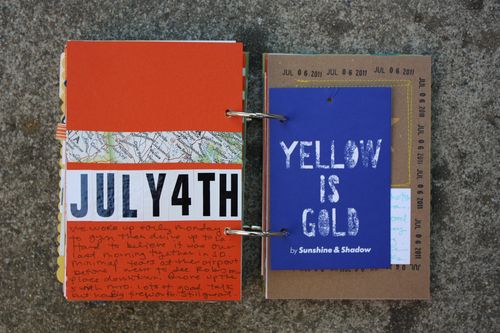
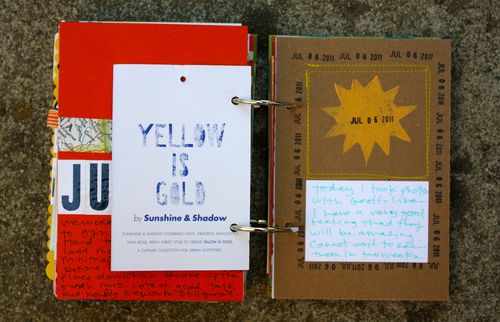
I added a clothing tag right into the book rings and then used a date stamp and some text on cardstock to fancy up the stamped sun card.

IMG_4026

I was able to use my parent's printer and some photo paper that I picked up while I was here. For the tye-dye spread, I added eight small photos that I printed in contact sheet format.

printing a contact sheet with iphoto. from elise blaha on Vimeo.

I filmed a super short video on how to use and adjust the contact sheet setting in iPhoto.

IMG_4027

For the next spread, I cut a paper bag from a trip to Hallmark down to 6×8. Love the sentiment.
IMG_4028

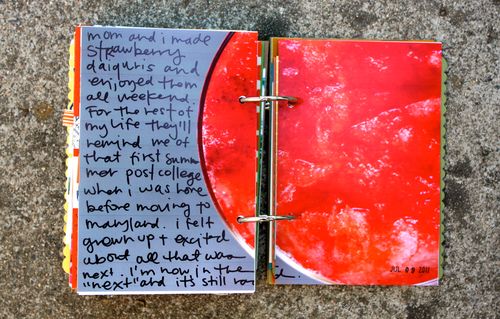
And last, I added another 6×8 photo and then some handwritten journaling right on top. For the text on this page and the tye-dye page I used an American Crafts slickwriter.

Questions? Holler in the comments. Still need a summer book? Get one here. Want to see more of this album? Go here. Are you working on your own summer book? Add photos to the flickr group or upload a badge to your blog or website.

Posted in , ,

25 responses to “summer minibook update #11.”

  1. Sarah Avatar

    Thanks for the tip, Elise. I just got a Mac a couple of weeks ago, so I am still messing around with iPhoto. Also, I made a new blog friend, and I thought you might find her inspiring. She is all about journaling and story telling. Check her out at: http://www.makingthishome.com/ You both reminded me of each other, so I wanted to pass on her blog.

    Like

  2. Leah Bean Avatar

    Do you need to have a Mac to have iPhoto? Can you do something similar with Picasa?

    Like

  3. Sherried Avatar
    Sherried

    I have been to several weddings this summer and would like to include the program, etc. from the weddings in my summer book but they are all too big 8 1/2 x 11. I have thought about cutting in half but the perfect place to cut on one side, runs through words on the other. Any suggestions?

    Like

  4. elise blaha Avatar

    I think you do need to have mac for iPhoto. And sadly, mac is all I know. Anyone else on a PC know of a program that will do this?

    Like

  5. elise blaha Avatar

    They are 8.5×11 to start? That is big enough that you can probably cut off some of the side and THEN cut it in half so it is not going through any words… right? I would get them down to 8×6 and go from there. And if you crop some out … it is okay! The point is to get it in instead of holding onto it for a few years and then deciding to toss it out anyway (that is exactly what would happen to me if I didnt get it in. 🙂 )

    Like

  6. Luisa Avatar

    This is super cool 🙂

    Like

  7. kym Avatar
    kym

    I love printing the iphoto’s contact sheet for my summer book because they are so small and cute. I plan on using them in the plastic protector that you shared a while back. However, I loved today’s video because I never knew I could customize it like that. Now I can get my photos a little bigger. Cool!

    Like

  8. Robyn :) Avatar
    Robyn :)

    When you get back home will you be adding more supplemental pages to the shop?
    I love the tie dye page!!

    Like

  9. oh shoot Avatar

    ok! I might have to get the summer mini. I have been loving your whole process.

    Like

  10. elise blaha Avatar

    🙂 thank you!

    Like

  11. elise blaha Avatar

    I am hoping to, yes!

    Like

  12. Sherried Avatar
    Sherried

    Thanks for the suggestion. I will see what I can do.

    Like

  13. Alexandra Avatar

    You can do something similar with big huge labs’ mosaic feature! Check it out here: http://www.bighugelabs.com/mosaic.php

    Like

  14. Leah Bean Avatar

    Thanks!! I will check it out!

    Like

  15. Suzanne Avatar

    I cut up that same Hallmark bag! yes, great sentiment 🙂

    Like

  16. jennie Avatar

    love! i am a week or two behind…won’t get to catch up till next week, so i’ll have to drool over yours in the meantime.

    Like

  17. andrea. Avatar
    andrea.

    thank you. that website is so much easier then measuring everything on pain + photoshop.

    Like

  18. Lmtblogs Avatar

    I usually just make a collage (in Picasa) then print out the image (you can choose the size). You select photos the same way Elise explained in the video. When they are in the “photo tray” you just click on collage in the bottom tool bar and go from there customizing the type of collage you want. If you have further questions email me lmtblogs at gmail

    Like

  19. Lmtblogs Avatar

    Picasa has a very similar setting. Just select your photos and “hold” them with the green button under the star then select print in the bottom toolbar. You will then just have to select the settings for your print out. Its easy and still picasa! good luck.

    Like

  20. Sherry Cartwright Avatar

    Thank you for the contact sheet tutorial. I was just thinking about this today as I was putting together our beach mini album.

    Like

  21. Julia Avatar

    thanks for the quick contact sheet how-to video… love how your summer book is turning out… every update just makes me want to take more photos:)

    Like

  22. AnnElise R. Avatar
    AnnElise R.

    Thank you so much for the contact sheet video! I read your blog daily (and never comment, sorry!) and knew you had posted something like this a while ago. So I searched your blog (super easy!) and found this post.
    THANK YOU!
    I love checking your blog each day. Have a great one! 🙂

    Like

  23. Jessica Avatar
    Jessica

    So inspired right now. i LOVE LOVE LOVE your mini albums, I’ve been sitting at the computer for almost two hours now fartin around your blog. It’s amazing!!! I love how you journal on your photos I’m going to have to get the pens you mentioned. One question…in the last 6×8 photo on this post that you also journaled on…is that one 6×8 photo you just cut in half? I really like that look of one picture two pages!

    Like

  24. elise blaha Avatar

    Thanks! And yes!

    Like

  25. Jessica Avatar
    Jessica

    Just kidding! I found the video where you showed us 🙂
    ps your awesome. Thanks again!

    Like

Leave a reply to Suzanne Cancel reply