enJOY it

an archived personal and craft blog from Elise Blaha Cripe.

IMG_2772

More than likely, your summer is going to include an event or two where you take lots of photos. My first one happened last weekend at the wedding we attended and we have a few more little trips scheduled the next few months.

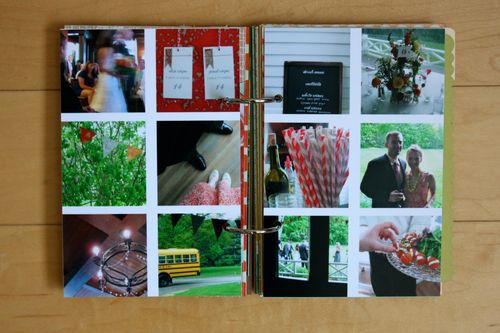
I am planning on making a grid similar to the one shown above for all these events. (Maybe – plans often change.) I could have done a similar grid to this machine stitched one, but I really wanted the photos to face eachother, not back eachother. I made this grid digitally in Photoshop Elements and I filmed a quick video to share the process :

digital photo grid from elise blaha on Vimeo.

I ended up making two 4×6 canvases with six photos each and printed them on Office Depot brand photo paper and cut them down to size.
IMG_2770
IMG_2771
IMG_2774

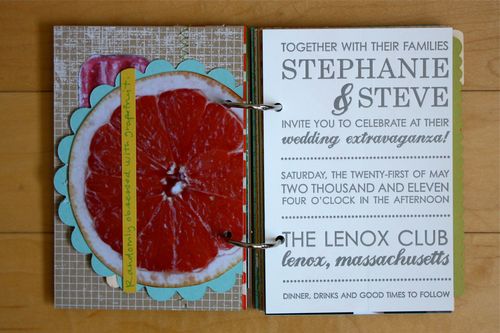
The left grid was glued back to back with the invitation that I cut down to 4×6 and the right grid was backed with the teal textured paper that comes in the book. I flipped it over (remember the holes are evenly spaced) so the textured side could be decorated.
IMG_2760

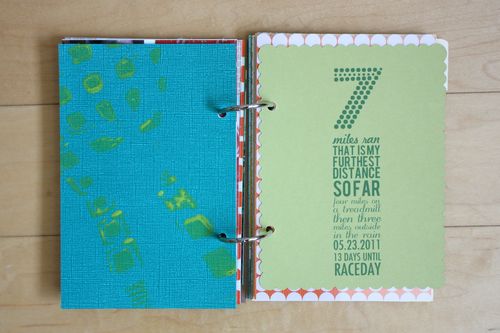
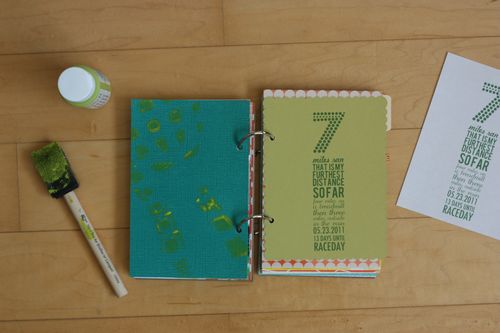
The last spread talks a bit about my running adventures. I created a 4.25×5.5 canvas in PSE that was the same size as that chartruese scalloped card and played around with the text until I had a design that I liked. I cut a piece of computer paper down to 4.25×5.5 and ran that through the printer first to see how the text printed out on the smaller size. I made a few simple adjustments (shifted the text up and to the right) and then let the scalloped paper go right through my printer. Simple enough.

I wasn't quite sure how I wanted to use the teal paper and played around with a few ideas before deciding to just go with the running theme there too. I used cheap craft paint and a foam brush to paint the bottom of my left running shoe and then "stamped" the shoe down on to the textured paper. The lime green paint showed up pretty well and I like how it all ties together color wise.

The stamped shoe got me thinking about other things I could bring into this book over the next few months. Trying to think outside the box more and more.

Still need a summer book? Grab one here!

Posted in

25 responses to “summer minibook update #4.”

  1. Taylor Groneck Avatar

    Awesome Elise! Quick question..how did you do the tutorial such that we can see the computer screen?

    Like

  2. tate Avatar

    I LOVE the stamped shoe idea, not to mention the bottom of Free’s are pretty cool looking

    Like

  3. elise blaha Avatar

    I have a program called screenflow – you can download it online for about $100. 🙂

    Like

  4. nicol Avatar
    nicol

    Thank you for all of the great tutorials. I’m a runner too & luv the idea of the stamped shoe. Great idea!

    Like

  5. Katie Avatar

    More great ideas and I don’t know what I’m doing with PSE so picking up lots of tips! Thanks for sharing 🙂

    Like

  6. Michelle Avatar

    I agree with comment above – I’m learning so much about PSE! And I LOVE the shoe print!!

    Like

  7. Larissa Avatar

    You are so creative! I love all your books. They inspire me to make more modern photo albums.

    Like

  8. Katie Stilwater Avatar

    You seem to always post EXACTLY what I’m trying to learn! I tried to make a grid of photos in PSE for TWO HOURS last night and couldn’t ever figure it out. Thanks for sharing your talent with us!! It’s sooo helpful!!

    Like

  9. Courtney Avatar
    Courtney

    Hi Elise! What fonts did you use on your chartruese scalloped card?
    I am loving how your summer book is unfolding, and I think this feature is so neat. I look forward to the next update. 🙂

    Like

  10. Laura Avatar

    I need PSE!!

    Like

  11. Kate Avatar

    Im loving the grid idea! It seems there are always more photos then space so this is great.

    Like

  12. Alexandra Avatar

    http://www.screenr.com/ is also a cool free version, but it limits you to 5 minutes.

    Like

  13. elise blaha Avatar

    Fortuna Dot, Kavaler Kursive, Bebas, Odstemplik and Futura

    Like

  14. Courtney Avatar
    Courtney

    Awesome! Thank you so much. 🙂

    Like

  15. Taylor Groneck Avatar

    Thank-you Elise and Alexandra!

    Like

  16. Gwen Avatar
    Gwen

    Really nice with the shoe print!!!!! I will definitely remember that idea.

    Like

  17. world@hotmail.com Avatar

    You seem to always post EXACTLY what I’m trying to learn! I tried to make a grid of photos in PSE for TWO HOURS last night and couldn’t ever figure it out. Thanks for sharing your talent with us!! It’s sooo helpful!!

    Like

  18. sandra Avatar

    I’ve debated whether or not to download PSE for what seems like years because I had no idea where/how to start using it. I’m finally downloading now because of you and these posts. THANKS for being so awesome and inspiring!

    Like

  19. Sarah Avatar

    just got mine today, now I need to stop being sick and than I can start. hooray

    Like

  20. libbi m. Avatar
    libbi m.

    trying this tutorial on my mac using elements but struggling. can’t seem to get the grid lines to show on mine. it’s just a white page with no guideline squares. do you have any suggestions? won’t let me click on the “rectangle tool” either. window pops up saying “could not use the straighten tool because this would create an empty document” hmm?

    Like

  21. elise blaha Avatar

    select the grid from the top bar View Grid. … not sure about the could not use… pop-up. maybe try creating a new layer first? under Layer New Layer.

    Like

  22. libbi m. Avatar
    libbi m.

    bingo! thank you!

    Like

  23. libbi m. Avatar
    libbi m.

    another question. i figured out the grid thing. thanks for the solution. now… how did you get the green paper to show as squares. mine was just clear and it would have been easier if i could have had some color paper to use as a guideline. know what i mean? thanks for all the help.

    Like

  24. elise blaha Avatar

    Make sure you have a color selected when you make the squares. Or use the paint bucket tool to color them in.
    elise joy blaha cripe
    blog : eliseblaha.typepad.com
    shop : elisejoy.etsy.com
    web : elisejoy.com

    Like

  25. kristen Avatar

    thank you for this tutorial! i’ve been trying to figure out how to do this!

    Like

Leave a reply to Courtney Cancel reply