enJOY it

an archived personal and craft blog from Elise Blaha Cripe.

USING THE 1 SECOND EVERYDAY APP

Happy February!

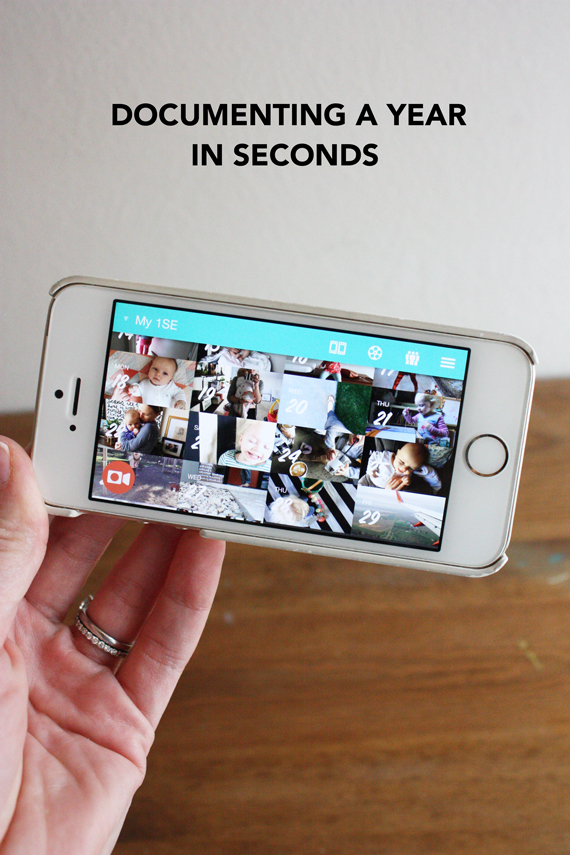
I wanted to share a bit about the app I am using and loving so far this year: 1 Second Everyday. If you follow me on Instagram you’ve heard me pledge my love to this about a million times already but I figured a blog post would give me a chance to share the full 31 seconds of January and go into a bit more depth about how I use and why I chose this documentation tool.

In December (or maybe November?) I was driving Ellerie to daycare and I thought recording a second a day would be a perfect idea for 2016. I knew I had seen it somewhere – I realized recently it was in the movie Chef – so I figured there had to be an app. I parked the car and immediately searched and ta-da! An app.

On January 1st, I started recording bits of our days. You can see the video below.

Capturing a second, it turns out is SUPER easy to do and SUPER easy to over-think. As the month progressed, I chilled out a bit about getting the “right” second and just thought about getting A second. I do not have “technical” app tips to share (you can find some here) but I do have some things that have worked for me as I approached this project.

Hold the camera horizontal. This creates a uniform landscape video which is not a requirement by any means, but I think makes the whole thing feel a bit more cohesive (plus it looks more like a real movie and less like a phone video). It took a bit for me to get into the habit (I take 95% of my photos portrait style on my phone) but now it’s second nature to turn the camera.

Let the subject move, not the camera. Because a second is such a short amount of time, I have found that by holding the camera still and letting the subject move I get a more interesting but less motion sickness inducing video. I sort of treat it like I’m taking a photo and frame things up first (using these basic rules) and then watch until I’ve gotten my second.

Think about the Big Picture, not the little one. Yes, a second a day is tiny! But 366 seconds for a year? That’s a decent amount of footage that is still COMPLETELY digestible. I think my favorite part of this is that I know at the end of the year I’ll have an already edited video that’s just over 6 minutes. More importantly, I know it’s realistic that at 6 minutes, the video will be watched (probably again and again). Plus, of course, I have tons of extra video footage now. At least 5-15 seconds a day which is WAY more than I would have had if I wasn’t working on this. If someday I get a wild itch to make a long movie of our family, I’ll be ready.

Save it for a rainy day. As with any new project, there is so much hype and excitement in the beginning. I found myself thinking “oh I should record this! And this! And also this!” But obviously I just want a second each day. So I made a list of all my “ideas” and when I inevitably plateau on this project, I’ll have that list to fall back on.

Export often. I am “mashing” the video snippets together weekly and saving them to the google photos app just in case something happens to my phone or the app. I also plan to save month-by-month in high-res. And a quick word on storage – once the second from the video is imported to the app, you can delete the full video off your phone.

So, why did I decide to go this route this year?

I think it’s three fold:

  1. My girls are growing rapidly and NOTHING captures that growth quite like video.
  2. For the current state of mind I’m in, I love not needing any extra space, storage or supplies to work on this project.
  3. It’s so very quick to capture the video and add it to the app.

Basically: time and space are limited around here, but LOVE is not. This feels like the best way to capture the love.

Of course, there is never going to be the perfect documentation tool for everyone during every season of life. This is working great for me now just as other things have worked well in the past and undoubtedly something else will work great in the future. I keep thinking though, that I would have loved to have used this to document my extremely crafty years before the girls were born. Or how fun it would be to have a video of just your hands (painting, typing, writing, cooking, gardening, driving) over one year. Or even just a video of a child’s face everyday (they change so much!).

It makes me giddy to consider the possibilities.

PS. I recorded a podcast episode with Cesar Kuriyama, creator of this app, last week. You can listen to it here.

Posted in ,

41 responses to “one month of one second videos.”

  1. Traci Avatar

    I saw this in the movie Chef as well but had forgotten about it until just now. I can’t wait to see your entire year documented like this! I wish I had done this with my puppy. She was so teeny tiny when we got her (6 pounds) and now at 11 months, she is 60+. So much growth, it would have been an ideal way to use this sort of documentation.

    Like

  2. young Avatar
    young

    Super fun! So many ideas! Will have to try this.

    Like

  3. Lisa Avatar
    Lisa

    piper’s growl. it slays me every. single. time.

    Like

  4. Erica Ambrosio Avatar
    Erica Ambrosio

    Loved your idea! I’ve heard about it before, but seeing your project development inspired me to record 1 second a day of my upcoming trip to the Amazon. It’ll be a great way to share the trip with friends.

    Like

  5. Antonia Krajicek Avatar

    Thanks to a mention by you on social media, I downloaded the app on January 1 and have been capturing my second each day since. With each completed week, I’m become more in love with this project and more excited to see the amazing time capsule of life that will result at year’s end. Thank you for always sharing and inspiring! 🙂

    Like

  6. Leigh-Ann Avatar

    that was so special… love it 🙂

    Like

  7. Caroline Avatar

    The video already looks great! First I thought why should I do something like that? I have no children, so it`s probably going to be a boring video… But I love the idea of filming your hands every day for a full year!! That would be so fun to watch! The only thing I ask myself is how do you film your hands when you actually need your hands to hold the camera?? Any idea? I would love to hear!!
    xx Caroline
    https://carolinespassion.wordpress.com

    Like

  8. Anna Avatar

    Like many others, I downloaded 1SE and have been playing along since you mentioned it. Thanks for continuing to share your videos – it’s great for the accountability factor. I was tempted to throw in the towel last week (January is not the most video-genic month) but I knew I’d end up feeling like I was missing out on the fun.

    Like

  9. Amanda Avatar
    Amanda

    Thanks for getting me onto this. I am now completely addicted to it as well. Having just had summer holidays in Aus, I also did a summer holiday mash up which had 2 or 3 seconds from each day, as I found we were doing so much each day. Looking forward to seeing your clips as your year goes along.

    Like

  10. Leah Noble Avatar

    I downloaded this at the start of January, inspired by you, but gave it up after a week or two. But then, I was thinking of shooting a second of the same part of my garden for a year, which IS inspiring to me, so I think I’ll give that a try. The winter part will be a bit boring though, I’d think. Then again, maybe not?

    Like

  11. Kelly Avatar
    Kelly

    I’m loving using this app! But agree, I could see myself plateau. Would love to see the list of your ideas for when that happens!

    Like

  12. Victoria Avatar
    Victoria

    I’ve loved seeing your videos on insta, and was wondering when I should start. Then listening to the podcast, obviously I can start in February. I’m not going to regret missing Jan but I might regret missing 4 months waiting for my son’s first birthday. Thank you!

    Like

  13. Brittany Avatar
    Brittany

    Oh, I’ll make a note to check out that podcast episode! I first heard about this app from your instagram account and have been (mostly) daily documenting since January. My husband and I are loving this app! Thanks for sharing!

    Like

  14. marcela Avatar
    marcela

    Thank you for sharing Elise, I’ve been enjoying the app along with you and it is sooo great! Would love to see the list you have (I think someone else said it) as I’ve made my own as well and i think the comments could be a great idea source for everyone to share? So very excited to see the whole year in video!

    Like

  15. Logan Avatar
    Logan

    Cani ask how you save as high res? What do I need to do to the saved copy (to my phone from
    the app) of my monthly video to save it as high res? Thanks! I love your video far. I wish I knew about this app much earlier, but so glad you mentioned it.

    Like

  16. Kiki Empey Avatar

    I listened to the podcast the other day and thought it sounded neat, but I had ‘missed’ the start of the year. Tonight as I’m reading this I realised this is the PERFECT way to capture my fitness journey. I am starting a 13 week challenge and this will be a great accompaniment to my documentation of it!

    Like

  17. Stacy Avatar
    Stacy

    Thank you for sharing this! My daughter is doing this with her friends. She just turned 21 last week, and her seconds are HILARIOUS. The best is one of her and a long-time friend clinking classes when we went beer tasting this past weekend.
    Now I’m thinking my own life isn’t quite as boring as I thought, and I’m going to have to do it, too.
    Thanks again for sharing! I especially love how you captured your sweet girls’ voices. 🙂

    Like

  18. april Avatar
    april

    Does anyone know if there is a similar android app?

    Like

  19. Victoria Avatar

    Eek! This is so stinkin cute! Ellerie’s little voice! : )

    Like

  20. Libbi M. Avatar
    Libbi M.

    super simple. i use any household item to make a make-shift tripod or something to prop up my camera. when you get your camera adjusted to location you want to film, simply press the record button and start filming. when you’re done filming, hit the “use video” button. i then select which part of the video i want to use by scrolling thru my video. hit the “scissor” button which will clip the scene you want to save.
    if you have any further questions, please don’t hesitate to shoot me an e-mail at libbimoore@gmail.com and i’m more then happy to help.

    Like

  21. Libbi M. Avatar
    Libbi M.

    very true, but so far i’m loving it. i agree with elise in the fact that this project is very digestible. it’s so easy to document one simple second a day. i’m in the process of wrapping up a 365 project that i started last march and i’m so thrilled to have 365 photos tucked into an album. i look at this project as a whole (the satisfaction of a completed project) vs. something i’m going to get bored with. i’m pretty good with self motivation when it comes to a project like this. i’m also interested in some of elise’s ideas she’s pulled together and hope she shares her list on the blog.

    Like

  22. Libbi M. Avatar
    Libbi M.

    yes, i’m wondering too. i’m able to figure out how to clip certain dates together to make a short video but wondering how she saves it to her google photos. can she do it strait from her phone? or does she have to plug her phone into her Mac and go from there.
    elise, if you have time we would love to know. thank you so much for inspiring me to take on this 365 video project.

    Like

  23. Rachel Eliston Avatar

    Wow! Just wow! I first heard about this when you were talking about it on here or on your podcast, I don’t remember which, and I first thought “well, a single second surely isn’t enough to capture anything” – I was sooooo wrong. Just watching your video makes me get chills. A second is enough. It captures the perfect amount of sound or light or scene and beautifully in each moment. I am currently starting project Lie after following yours for years but already I’m thinking that this app has it down! Haha! Thank you so much for sharing – as always you are so inspiring 🙂 And, can I just say how much I adore watching little Ellerie interact with Piper – So stinkin’ cute! That little voice! Heart warming!

    Like

  24. Katie K. Avatar
    Katie K.

    Thanks so much for sharing info on app! I had never heard of it before. I immediately shared it with my whole family. And surprisingly my snapchat loving 25 y.o. started asking me questions on how to use it. I sent him to your blog of course. I’m wishing there were better tutorials than the site offers. I want to shorten my learning curve as my brain is busting with ideas for video snippets. Here’s hoping that with you and readers using it, more tips and tutorials will be available.

    Like

  25. Katie K. Avatar
    Katie K.

    April – it’s available for android on the Google Play store.
    Katie

    Like

  26. Laura @ Laura Radniecki Avatar

    I have this same question about saving the monthly mashups in High Res. I was going to comment to Elise and ask the same thing.
    I too am saving my weekly mashups as a way to ensure backup in the short-term and then doing another one of the previous month, to have monthly videos.
    I’ll export the year all together at the end.
    But I’m not sure if I’m already saving them in high res or if that is something I have to set specifically.
    Thanks for your help, Elise!

    Like

  27. Tiffany Avatar
    Tiffany

    Thanks for sharing! I think this is a project I can do. Will you share your list of ideas for when you plataue? Thanks.

    Like

  28. Kristen Avatar
    Kristen

    I downloaded this after listening to your podcast and was going to start next week on my daughter’s 5th birthday. But once I had it I wanted to play around immediately! So I ended up making a video with clips from our day at a children’s museum and I love it! I think “practicing” with a short event is a good idea before diving into a full year. I quickly saw what works best (in my opinion) and now I’m ready to start my year with a clearer idea of what I want!

    Like

  29. Mickie Avatar

    That video was incredible. This is such a beautiful project Elise. Thank you for sharing the progress! It makes you really appreciate the smallest of small details of daily life, don’t it :)?

    Like

  30. Kelly K Avatar
    Kelly K

    Download the Google photos app and tell it to upload your camera roll. Then when you save the video it automatically saves to the camera roll therefore automatically uploading to google photos.

    Like

  31. Abby Avatar

    This is so neat–I love it!

    Like

  32. Rob Avatar
    Rob

    so cool, that is going to be a great video when its complete

    Like

  33. nicole : snap doodle jot Avatar

    I am a new convert to this app thanks to seeing a video of yours on Instagram. I LOVE it and when I shared my first week’s worth of clips on Instagram and FB, friends and family really responded. I think the fact it’s ease of use makes it feel accessible to a lot of people for getting creative or documenting life, especially in this busy age when so many folks feel they have no time or ability to do either.

    Like

  34. Carly Friesen Avatar

    I’ve been using this app too (and loving it), but wow, there is something special about having kiddies in the video. SO awesome to see the little moments. 🙂

    Like

  35. Sarah Cambio Avatar

    I love this app but keep forgetting to use it :/ It’s so awesome though!

    Like

  36. Caroline Avatar
    Caroline

    Thank you so much Libbi! 🙂

    Like

  37. deneen Avatar

    How do you capture the shots of yourself holding the baby from above? Is someone else recording the video or do you use a tri-pod? My granddaughter is almost 2 1/2 and my daughter is expecting a new baby in August.

    Like

  38. --m Avatar
    –m

    What an awesome video!!

    Like

  39. Hilde Avatar

    So inspiring, just downloaded the app. I turn 29 in a couple of days, and plan on starting then and documenting my 29th year. This year will include the arrival of our boy in April, so I’m beyond excited about this project!

    Like

  40. cindy Avatar

    “Let the subject move and not the camera” is such a great piece of advice. It truly makes such a difference to the end result.

    Like

  41. Libbi M. Avatar
    Libbi M.

    Thank you. I did it and it worked.

    Like

Leave a comment