enJOY it

an archived personal and craft blog from Elise Blaha Cripe.

TIMERCAMtips

I get a lot of questions about the TimerCam app on Instagram and so I thought it was about time I wrote a post about how I use it and my "tips." This app is hands down my favorite photo app and it gets used almost everyday. I love that it's free and doesn't come with 100 bells, whistles and filters. It just takes the photo on a timed delay.
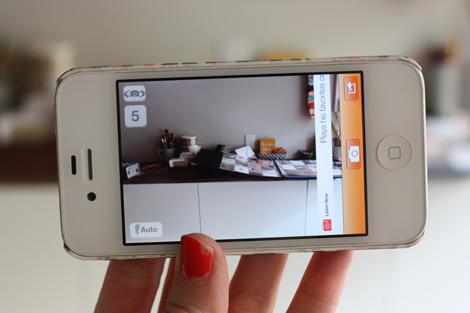
Timercam8

The app looks like your normal phone camera but you can set it to take the photo 5, 10, 15 or 30 seconds after you hit the camera button. Just like on the normal phone camera, you can tap the screen to select the different area that you want to focus on. It counts down (with a number countdown and a beeping sound, unless you turn it on silent) and then snaps the photo. You then have the option to "Save" the image to your camera roll or "Cancel" and try again.

Timercam7

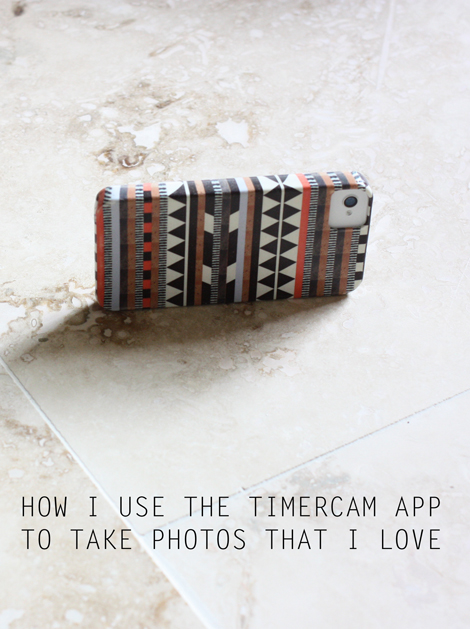
I balance my phone on it's side for every single TimerCamphoto. I've never used a tripod and personally will not because I don't want to deal with extra stuff. I have a case from Society6.com and the side is level and perfect for balancing. (ps. I took the above photo with the timer on my big camera while using TimerCam. I think there is some sort of Olympic medal offered for this sort of thing.)

Timercam4

About 50% of the time, I rest my camera on the ground and the other half I am resting it on my workspace, a table, a bookshelf, a chair, a pile of books… anything that is directly across from what I am trying to capture.
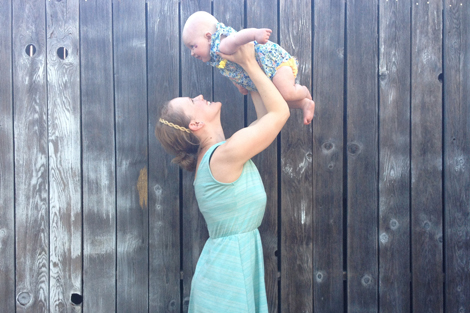
Currentlynov

I select a reasonable amount of time to get from point A) behind the camera to point B) in front of the camera. Then I balance it on it's side, give it a second to focus and I gently hit the button and move into place. (For the shot above, the phone was balanced on a small table on top of our outdoor couch – total hassle, but it's one of my favorites.)
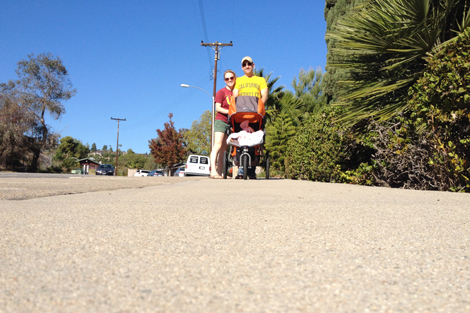
Timecam4

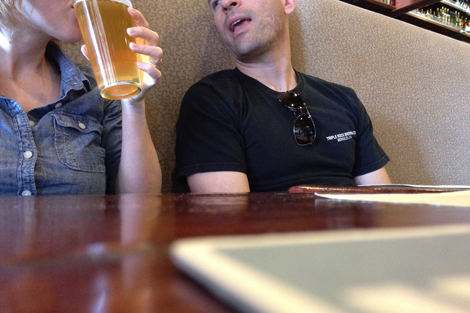
One thing that I like about placing the phone on the ground or table is that you usually get a pretty level "horizon" in the shot. In the foreground, there is a lot of the surface before you see the subject. This is totally just a personal preference, but I think it's a fun look.

Timercam3

Using the timer tends to give me a pretty wide shot which means a lot of the background gets in the image. It's rarely (ever?!) flawless, but it's part of the story too.
Timercam5

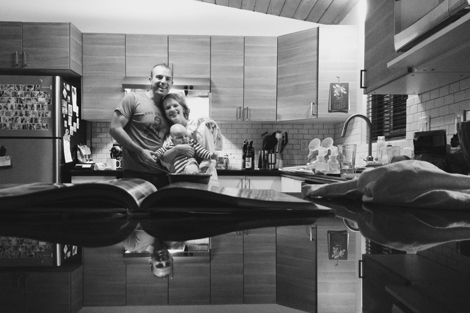
I also love how sometimes details get cut. (This happens all the time when I put the phone on the table and shoot).
Timercam6

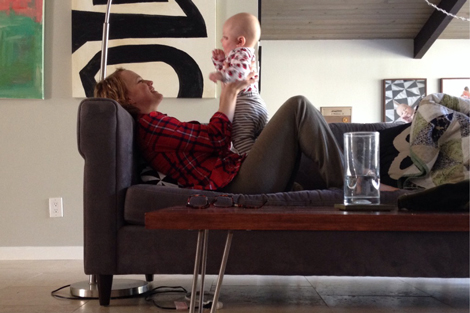
People often ask how my "tries" it takes to get the shot. The average is two. Sometimes I am thrilled with the first photo and we move on with our lives. Other times, I learn from the first photo what has to happen (the pillow was blocking the baby, my feet look weird, etc). Still other times, I get the shot set up and then something goes wrong (someone blinks, the wind comes, etc) and we end up taking three. Like everything else, though… practice makes better.
Timercam2

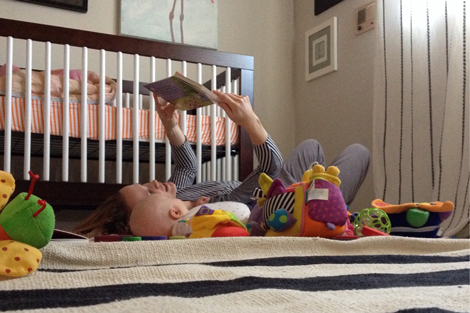
Obviously, in order to actually get these shots I have to break from what we're doing and set up the camera then run into place. Because of this, I have tried to make the process as simple as possible (another reason why I am thrilled my phone balances without props). I like to think that the reward of having these memories saved with photographs is worth the quick disruption on occasion.
Timercam

Overall, I try to trust the camera. Using the self timer provides images and perspective that I never see, making some of these photos my most treasured.

Hope that helps! Any further questions? I'll follow up in the comments.

Posted in

55 responses to “let’s talk TimerCam.”

  1. Jessica Avatar
    Jessica

    Wow, I want to go home and try now.. Thanks for sharing. One question, is this only available for an I-phone? Or also Android?
    Thank you!
    Strange to think that I have been reading your blog everyday for almost 2 years now.. Thank you.

    Like

  2. Marian Avatar

    Thanks for this post! I downloaded the app after reading one of your previous posts, bu have yet to put it to use really. Reading this and seeing your result has definitely inspired me to start experimenting with it!! 🙂

    Like

  3. Stephanie Avatar
    Stephanie

    LOVE this post! And I need to remember to use this app more often. 🙂

    Like

  4. Traci Avatar

    Somehow you are able to break what you are doing and still make it all seem so natural. I left a comment before saying that I have only used this app on a couple of occasions. I, like you, love everyday details in photographs…this is going to come into play in 2014.

    Like

  5. Elizabeth Avatar

    Love your ideas and tips! One thing I love about TimerCam is that it’s also great for selfies, because the outer camera on my “ancient” iPhone 4 is much better then the one on the face of the camera. I can set up Timercam and then turn the camera around to use the better camera. Love it!

    Like

  6. Misty Avatar

    Love this idea and will be downloading the app right now!

    Like

  7. Amy B Avatar
    Amy B

    Got this app after you mentioned it awhile ago. Thanks! Came in handy when we were doing a scavenger hunt over the holidays where the whole team had to be in the pictures. My phone won’t always balance, but I have found that my water bottle (which I usually have with me) works great to lean the phone against to keep it upright.

    Like

  8. Laura Avatar

    Any tips for getting the image in-focus? I feel like my timer cam photos tend towards the dark & blurry.

    Like

  9. karin hope Avatar
    karin hope

    my android phone has similar timer options built into the phone’s camera settings, so you may not need the app

    Like

  10. Judi Avatar
    Judi

    Just downloaded — can’t wait to try it out – no more excuses for ME not being in the picture

    Like

  11. Kristen@fit2feelbetter Avatar

    Great app! I use it to take photos of me while working out. Weird, I know, but it helps to make sure I am using correct form. 🙂 Another app I use is Burst Mode. It counts down and then takes a ton so you can choose a good one. But that defeats the purpose of simplicity right? Anyway, it might be good to use when taking a group shot and there is always someone blinking!

    Like

  12. Tiffany B. Avatar

    Love it! I use the same app and it comes in handy. I love that you capture your day with little E this way.

    Like

  13. elise blaha cripe Avatar

    I think good lighting is the most important.
    I take most of the photos in the morning or early afternoon when I know the light is great in the room.
    The black and white one above was taken at night and totally not great color wise, so I used an afterlight black and white filter to make it look “better.”
    I’ve noticed that the best shots I take are not completely in focus – if you zoomed in on any of these above they’d be a little blurry, but not enough to ruin the image.

    Like

  14. Elizabeth Beattie Avatar

    Thanks so much for sharing this! I was wondering about this exact thing yesterday because I am going on my first solo 5 mile hike this morning and wanted to take a few selfies without having to hold the camera in my hand.
    Warmly,
    Elizabeth

    Like

  15. emily hassman Avatar

    I always love these photos of you in your environment. I don’t think I’ve used this app since I upgraded to a 5C, which has rounded sides (boooo). I have to lean it up against something. I might buy a little $8 tripod on amazon… seems too complicated, but it’s the only way I’m ever in the photos 🙂

    Like

  16. Adeline Avatar

    Thanks for sharing! This is very helpful!
    xxx

    Like

  17. Ckah Avatar

    THANK YOU !!!! Thanks for taking the time to basically give me (the most un-saavy photographer ever; especially on iPhone) a lesson and some hope that this app could work for me. I downloaded it months ago when you first started using it. And just never Tried it out for real, but now I will. Appreciate all your tips/ and letting me know that there is a trial and error period

    Like

  18. A Beautiful Mess Avatar

    Great post elise! I’ve never used this app!
    xx

    Like

  19. Deneen Avatar
    Deneen

    I’ve been using this since last year when you said something about it and I love it so much! Thanks for the great info as always!

    Like

  20. Vivid Avatar
    Vivid

    I’ve been using this app since early last year after seeing you mention it. It has been invaluable for sure, thank you so much for sharing! I have friends ask all the time how I get pictures of me with my kids and I always spread the word about this awesome app and you’re awesome blog!

    Like

  21. Sarah Avatar

    You really have a knack for setting up great situations for this app! I’m going to make a point to try some of my own this week.

    Like

  22. steven andrew Avatar

    I used to use this app all the time but noticed it made the quality of my photos really grainy. I deleted it but I’m thinking it was just the lighting in the house now. I still have a lot to learn obviously, haha. Now I’m going to re-install and play around with the app. Thank you!

    Like

  23. Michelle Avatar

    Great instructions!
    By the way…next time you are looking to buy Paul a gift…
    http://www.visualanatomy.com/shop/item.aspx?itemid=3

    Like

  24. Welcome Home Taylor Avatar

    I love these tips! I’ve actually never used this app before, but I can’t wait to try it out!
    xoxo
    Taylor
    http://www.welcomehometaylor.com

    Like

  25. Brenda Buss Avatar
    Brenda Buss

    So glad I found your blog. You’re awesome inspiration! 🙂

    Like

  26. Mere | Not Merely Living Avatar

    This is so helpful! Thanks so much, Elise. I just downloaded the app!

    Like

  27. Mikki Avatar
    Mikki

    that is my only complaint with my iPhone 5c is the rounded corners, even when I lean it, it slides down.

    Like

  28. Debbie Avatar

    Thank you, Thank you, Thank you! I am of the generation that needs help with these “new” things. I love your photo’s and will download that app. A great help!

    Like

  29. michelle t Avatar
    michelle t

    I’m still working with my dslr. I just love documenting regular life. Caught my boys yesterday digging us out of 13 inches of snow. Love my pics. Michelle t

    Like

  30. Ashley Avatar
    Ashley

    Hey Elise! Quick question about your Society 6 phone case – I LOVE that site but am hesitant to buy a case from them because it doesn’t cover all the buttons and stuff. Do you like yours or love yours? Is it durable?

    Like

  31. elise blaha cripe Avatar

    that is a super bummer! I wonder if the 5 has the same issue? thanks for sharing!

    Like

  32. elise blaha cripe Avatar

    that is so sweet! thank you!

    Like

  33. elise blaha cripe Avatar

    I love mine. I’ve had it and the phone for over 18 months and no issues at all. 🙂

    Like

  34. Lucy Avatar
    Lucy

    I think the most important thing about this app is that it puts the Mom (or Mummy in my case) back in the picture. All too often we’re behind the lens and I think it’s important our children see our growth and change as much as their own in future years.

    Like

  35. Abbie Avatar
    Abbie

    Thanks for the tips! I just downloaded it. Your pictures are so inspirational.

    Like

  36. Angela NJ Avatar
    Angela NJ

    Wow…your post is far more helpful than the information I read when I looked up the app after reading your weekend post. I’m new to iPhone (and the concept of apps), so this might be a silly question. Does this app override the standard camera feature (ie: if I click the camera button will the screen you show above automatically come up) or do you click the app and then take a photo within the app? I’m hesitant to get any of the photo apps because I’m unclear which ones are independent of the standard camera feature and I might not want to access an app every time I take a picture. If you’re still reading all of this…thanks.

    Like

  37. Linnea Avatar

    Here’s a little focus trick: tap and hold (hold is the key!) to lock the focus where you want it to be.

    Like

  38. Brittany H. Avatar
    Brittany H.

    I use an app called Fast Camera that has the timer function but will also take more than one picture. And you can set it to take pictures as often as every 1/10th of a second to every five minutes. It’s slightly less simple (but still pretty simple) but I often will set it, get on with whatever I’m doing and let it take a bunch of pictures. It allows me to truly get reengaged. Plus, it saves every picture for you to review later and decide which ones to keep. I usually don’t look through until the kids are in bed. I find it a lot less intrusive to me and my kids (who are 4 and 6 and much more aware of me breaking away to take a picture).

    Like

  39. Johanna Avatar

    Your standard camera feature is never overwritten by apps like this one, Instagram, vsco or similar. Apple would never allow for this 😉 Any time you want to use the app, you need to directly open it. Hope that helps!

    Like

  40. Kellie Winnell Avatar

    Love this post Elise and downloaded the app right after reading and had a play and can’t wait to use it more…

    Like

  41. rachel swartley Avatar

    The iPhone 5s has flat sides!

    Like

  42. Chrisy@GoodNorthCoastLife Avatar

    Thanks for the on-going inspiration Elise. Have downloaded the app and looking forward to trying it out. Ellerie will cherish these photos in years to come. Great work Mumma. 🙂

    Like

  43. Jennie Avatar
    Jennie

    Great post. Very helpful.

    Like

  44. Shauna Avatar
    Shauna

    Thank you so much for informing us about this app.
    I have been thinking how I can take non selfless of myself and but doing things.
    Because it’s just us and no one else to help take the photo.
    So unfortunately a lot of things have been missed 😦
    And she’s getting so big.

    Like

  45. Jenny Avatar

    Yes timercam app all the way! I would say I have caputred some of my fave moments with my kids with this handy app for sure.
    Love!

    Like

  46. kelsey Avatar

    I downloaded this after seeing you use it, and I love it. Here are a few I took of my daughter and I during bath night: http://snappycasualblog.com/bath-night/
    I also downloaded one called CameraTimer so that it will take multiple photos instead of just one.

    Like

  47. kelsey Avatar

    Hi Brittany,
    Did the app you downloaded cost money? I am looking for it but there seem to be a couple with that name. Thanks!

    Like

  48. Brittany H Avatar
    Brittany H

    Yes, I think it was about $5 so pricey for an app but I love it. It’s by i4software if that helps.

    Like

  49. Coty and Mariah@quirksandtwists Avatar

    Super informative! This is such a helpful post, thanks!

    Like

  50. J3SS1C4 Avatar

    I’ve been wanting to try this app out a bit more, but when I’ve used it, I’ve never had huge success with it, so now you’ve inspired me to try it again. I was wondering one thing… The photo of you, Paul and Ellerie out walking… About how far away would you have set the phone? I’d love to try this with my partner when we’re out running or bike riding!

    Like

Leave a reply to Hannah Cancel reply