enJOY it

an archived personal and craft blog from Elise Blaha Cripe.

Plprocess

While prepping the spread that I shared yesterday, I decided to take note of how I build my weekly layouts and time how long it takes. I get a lot of questions about how long Project Life takes me. It varies based on the week for sure, but on average I assumed about an hour. Turned out it's closer to about an hour and half including photo printing.

Last year I worked on the weekly spreads throughout the week. I really liked the system and had fun with the project. This year, I am pretty much building them all at once, the Monday or Tuesday after the week is over. I am able to do this because I am now sharing the pages a week later on the blog (instead of the following Sunday). As a result, I think my spreads are "better" which for me means they are capturing the stories of the week more fully AND they feel a bit more cohesive.

I absolutely do not think there is a right or wrong way to do this project. For me, it's been all about trial and error and recognizing what works and what doesn't. The goal is to complete the year in weekly spreads and be happy with the layouts – not to develop something monumental or earth-shattering.

So let me break it down.
Plprocess1

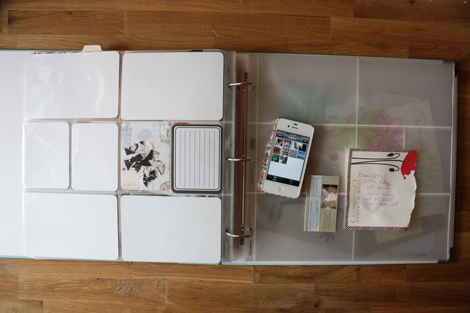
Monday night I staretd with an empty spread. First I figured out which photos I wanted to use (you can see some on my phone – I create an album of photos for the week I want to include) and the stuff (this week is was a quote from an email and a business card) I had to go with.

Plprocess2

Then I sat at my computer and printed photos. I had six from Paul's trip that I cropped into 4×4 squares for an insert. Between my phone and my big camera, I also had seven 4×6 photos and four 3×4 photos that worked.

Below is a video of how I print my 4×6 and 3×4 photos at home. I have shared this before, but if you're new, you might find it helpful.

printingphotos from elise blaha on Vimeo.

After printing, I cropped my photos to the appropriate size and rounded the corners. This whole process took me 35 minutes (remember I do little to no post-processing on my photos printing is pretty quick).

Tuesday morning, I started again with everything I had for the week. This included my photos, a quote from an email I had jotted on scratch paper and a business card from my midwife. I also knew that I had two stories I wanted to share. One about the glucose testing and another that didn't make the blog. Those would both be jotted down on 3×4 journaling cards.
Plprocess3

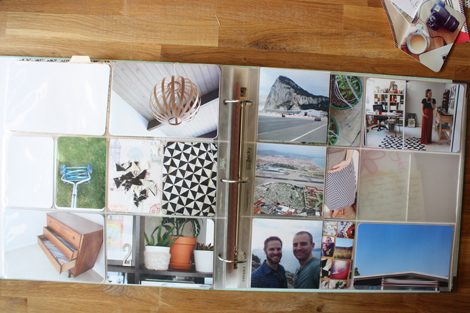
My next step is to get photos in pockets. Usually, I add the "naked" photos in first and then see what I can do to embellish and fluff things up. Nine out of ten times I hate the layout at this stage because it feels empty.
Plprocess4

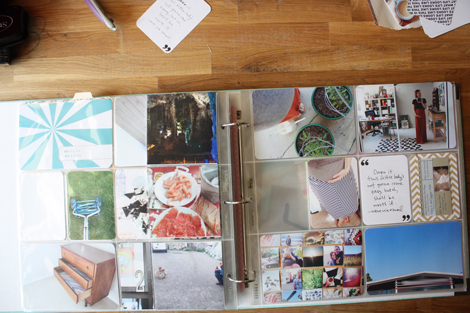
Next I add in the "stuff." The quote from my friend was written on a quotation mark journaling card
and I sewed the business card to a patterned filler card. I also have a good idea of the layout's color scheme by this point so I am able to add the date card. I used the colors of the photos to help pick the best "date card." Thankfully, there are a lot of neutrals in the set so something will
always match, but this was a good week to add the bold teal.

Next I write my journaling on 3×4 cards and add them into the empty pockets. This helps "fill" the space a bit more which I like. Sometimes things get moved around. In this case, the mower photo moved left a pocket.
Plprocess5

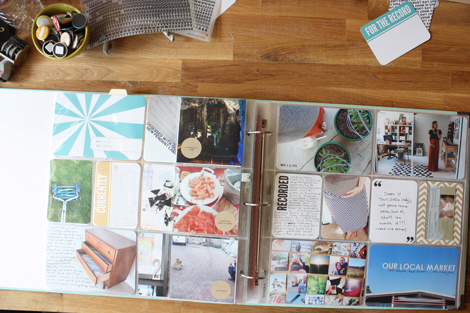
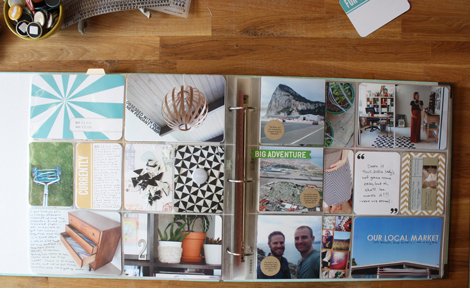
And last I go through and add notes to the photos that need them. Not all photos need context. Like I didn't write anything on the photo of the lawn mower or the little plants. They sort of speak for themselves. The dresser photo had some great white space, so that got handwritten journaling and I added information to the lamp photo with letter rub-ons. I added a few letter stickers to that market photo and a few date stamps here and there.

Paul's photos needed more, so I added the circle stickers with typed journaling (the text is what he provided me when he emailed the photos). The stickers share what's happening in the photos and they help unify them so they do not seem as random. (I am so glad that I am focusing on including more photos from Paul's adventure and that he is so willing to share with me this year.)
Plprocess6

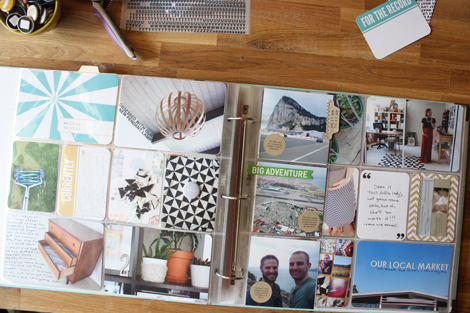
The insert needed something extra so I added the BIG ADVENTURE sticker on top of the page protector. The green works well because it matches the lawn mower photo. The very last step was to add a tab to set it off the background. This makes it clear that there is an insert and it matches the circle stickers.
Plprocess

And I hope that helps explain my process. It was actually interesting for me to break it down in this way and see how I really work through the week. I feel like this method is simple but successful and I will keep doing it until it stops working.

Questions about Project Life? Check here and then if you don't see an answer, ask in the comments. For a full product source list, check yesterday's post. 🙂

Posted in

21 responses to “my weekly project life process.”

  1. Ffion Avatar

    Awesome, thank you for sharing your process! 🙂
    I’d really love to have a go at Project life sometime… maybe next year… (although now would probably be an interesting time to start…) but I’m so bad at consistently taking photos and documenting my life in any way xD
    I’m impressed at how clear and conscise you are about everything you do and about how you convey everything to your readers.
    I love getting insights into other people’s work flow, as I always feel mine is way to disorganised and filled with too many distractions… Ah well… time management and priorities… it defeats me…
    Thanks for another great post!

    Like

  2. Kendra Avatar
    Kendra

    Is there a specific app you use on your phone to create an album for the week? From the photo above – it looks like a calendar or grid. Can you expalin a little more on the organization on your phone? I have an iPhone am am trying to learn more how to organize my photos on it. Thanks for sharing your process:)

    Like

  3. sandra Avatar
    sandra

    you have no idea how many times i’ve watched that video. while i follow and get things printed, they never print out very well. my photos were taken with my dslr and when i shrink them to say, 3×4, they are super blurry. from what you know, do you think this is my photos or me shrinking them down so much? i’m thinking the latter since when i print them at a larger size, i once tried 8×10 and they looked fine and sharp and crisp, how can i prevent this? should i resize them first and then shrink and print? help. please.
    and thanks!!

    Like

  4. Ashleigh | Love Stoned Avatar

    ohhh! thanks for sharing your process – its really helpful to someone who hasnt started this yet…but I really LOVE the idea! keeping us motivated, always!
    xx Ashleigh
    http://www.ashflynn.blogspot.com
    GIVEAWAY ON MY BLOG TODAY!

    Like

  5. elise blaha Avatar

    Oh no! That is really too bad! I have not had that problem with shrinking photos. Is the canvas that you have created 3×4 inches and 300 dpi? If the dpi is smaller that might affect them and make them more blurry. Have you ever tried having them printed 3×4 by a photo printing service? I wonder if everything would turn out okay then? I wish I had more insight on this or I had experienced the same thing so I knew what to recommend…

    Like

  6. Kim Avatar

    Well…I finally took the plunge with the HSN sale and bought a project life kit. I’ve been iffy about it for so long but a lot of things (the price + the recent downsize we just did which eliminates my craft room and makes it a craft basket) are coming together all at the same time so I’m going to go ahead and try it! I’m loving all of your layouts so thank you for this post!!

    Like

  7. elise blaha Avatar

    I just added an album to my camera roll. If you have updated your iPhone recently you should be able to do it too. 🙂 Just click the + button on the top left then name your new album and hit save. A screen will pop up and you can then add photos from your camera roll to the the album. If you do not see the + button, make sure you have updated to the newest IOS version. I have an iPhone 4s – not sure if that makes a difference. 🙂

    Like

  8. emily hassman Avatar

    Thanks for sharing your process, Elise! I think my weekly spreads are taking way more than an hour or an hour + 1/2, but I guess that’s OK because I am enjoying the time I spend. 🙂
    Have you ever posted about how you decide which pics make the cut? I find I’m taking a lot more photos each week, and sometimes have too many that I like. (Obviously sometimes I do an insert, but other times that seems like overkill.)

    Like

  9. Benedicte Avatar
    Benedicte

    Thank YOU so much!!!
    I am currently starting Project Life AND my first baby quilt using your triangle tutorial. I have crafty stuff spread literally all over the place!
    ThAnk You!!!
    xx

    Like

  10. Renae Avatar

    This is great, it made me realize why your layouts seem more cohesive and mine feel jumbled. Will try this next week, thanks for sharing!

    Like

  11. Lori Avatar
    Lori

    This. I love this. I love to hear about other people’s creative “process”. It lets me know that while their end product might look effortless, it’s not without effort, thought and planning. Thank you for taking the time to share this.
    And also, your blog is just my absolute favorite. I know that you spend a lot if time on it and it shows. It’s professional and positive and a joy to read. Thanks for taking the time to make it that way for your readers. As a result of reading your blog, I’ve been inspired to try both knitting and quilting. Two things I’d never even considered before. I’ll let you know how it turns out! 🙂

    Like

  12. J3SS1C4 Avatar

    Thank you for sharing your process. It’s always interesting to see how other people work on their pages!
    A side note… I wish my spreads only took me an hour and a half! I’m learning to do them digitally, so it’s taking me about 3 hours to do each spread! I don’t mind though, I find it super relaxing and enjoyable! It’ll take me even longer once I start dividing it all out to print, too, but I don’t print at home, so at least that bit will be quick and painless!

    Like

  13. Sarah Avatar
    Sarah

    Elise,
    I have been following your blog for a while but this is my first comment. I just wanted to say thank you for your posts on Project Life every week and especially this one. It got me re-energized to do my Project Life and helped me with some photo processing.
    Sarah

    Like

  14. Jillian L Avatar

    Happened to see that the Project Life HSN special was on when flipping through channels, and thought I might stop on it… saw you & all of your photos for a moment! How exciting for you!! 🙂

    Like

  15. jodie allen Avatar

    During spring break my in-laws took my kids for one night and my husband was out of town so I sat down and got January done in my first album! I was excited at first, then got so behind I was getting stressed but now I’m super excited again! Just need to get caught up and stay caught up! Anyway, I was wondering how you actually organize the pieces? I still have all the cards in the box they came in but it’s hard to see them all. And I can’t figure out a good way to store little bits from the week or have a place to write down thoughts/quotes/etc. I’d love to see how/where you store everything! Thanks so much Elise!

    Like

  16. Mel Avatar

    Wow you are fast and organised. Currently I’m not printing photos at home to see if the cost saving is worth the wait. It makes it tricky to catch up but so far so good.
    Thanks for sharing.

    Like

  17. Marie Avatar

    Thanks Elise for sharing your process!

    Like

  18. Skye Avatar

    Thank you so much for sharing! I admire how you’re able to keep up with this every week and make it look great. It’s nice to know that you are not always happy with your spread during some of the in-between stages because that happens to me too. It’s amazing how your simple touches really pull it all together.
    I take a lot of photos, and choosing which ones to include is actually the PL step that takes me the most time! I create a folder on my computer for each week and copy the photos I like best into that and then delete until I have a reasonable amount. Does anyone have any tips for managing photos for PL? I think this is why I tend to get behind.

    Like

  19. elise blaha Avatar

    Good question. This is something I should share photos of. I keep all of my 3×4 cards (the ones from the Seafoam and baby kit plus anything I have printed or from SC) in a shallow box in a drawer of my desk. I have a decent idea of what is in there and I would say I go through it every month just to remind myself and make sure I am using a variety of pieces. 🙂

    Like

  20. Jerrica Avatar
    Jerrica

    Elise, I am curious what binder you are using for your project! I noticed it’s not the Project LIfe Binder Becky Higgins sells on her site, and I like the look of your binder with the rings visible! Where can I buy one like yours?

    Like

  21. elise blaha Avatar

    It is the Project Life Seafoam binder. 🙂

    Like

Leave a comment