enJOY it

an archived personal and craft blog from Elise Blaha Cripe.

Plwk40

Week 40 and I still love this project.
Plwk40full

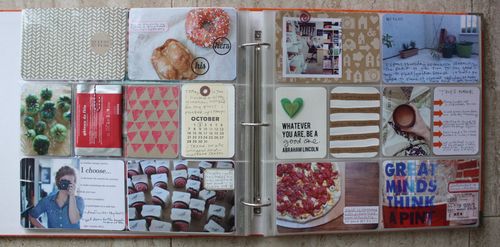
(click photo above to enlarge for a [somewhat] clearer image.)

Annnnd, I am caught up. I've done a decent job staying on track with this album throughout this busy fall, but posting about it makes it feel official. For the record, if you are on the fence with how long PL takes, know that getting these posts together takes almost as long as completing the spreads each week – and is way more boring. 😉

Plwk40left

Pretty standard left page. I left the tea package pocket from last week alone so this week you see the other side. And you might notice that on my goal photo (bottom left), the last two goals were written in. I accidentally printed an unfinished version of that graphic and instead of wasting the ink and the paper to reprint, I just hand-wrote the last two goals. (Perfectionism would absolutely destroy me on this project.)
Plwk40detail2

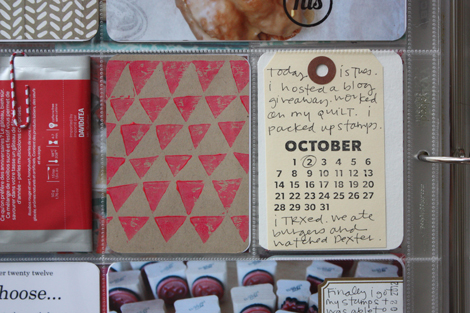
Into one of the small pockets, I stuck a trimmed down piece of my stamped stationery. And into another one, I put a manilla tag with Kelly Purkey's cute October stamp and some journaling.

Plwk40right

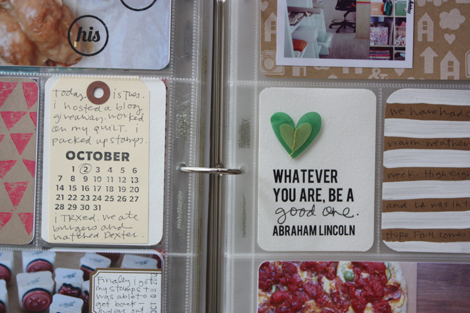
And the right is also pretty standard. That kraft and white journaling card is just hand-painted stripes.
Plwk40detail

Hooray, hooray and on to the next week…

supplies / Paper Source
circle labels, Martha Stewart & Avery labels, ELISE JOY his and hers stamps, Amy Tangerine heart sticker & patterend paper (kraft with white icons), Studio Calico patterned paper, SMASH paper clip, Office Depot date stamp, Design A page protectors, Clementine core kit, Bebas quote font. I use a Fiskars corner rounder (it's not amazing, but it's lasted the longest of any corner rounder I've ever had). I am using a Zig Millennium 0.1 pen and Recollections glossy marker throughout this album.

Confused by Project Life? Start here. Have a question about how I am tackling this project each week (including questions about the quotes & photo printing)? Check here. See all my Project Life posts here.

Posted in

26 responses to “project life : week 40.”

  1. eek! Avatar

    I love that kraft Amy Tan paper – so cute! And I love your quote about how perfectionism would destroy you on this project – I agree – sometimes it’s ok to just let it go and accept what you have made as good. Thanks for the inspiration!

    Like

  2. nihal Avatar

    love it. i am actually waiting for the new digital products to be released to start with project life but sometimes I wonder if I should go for the paper products..

    Like

  3. Lindsey Soulsby Avatar

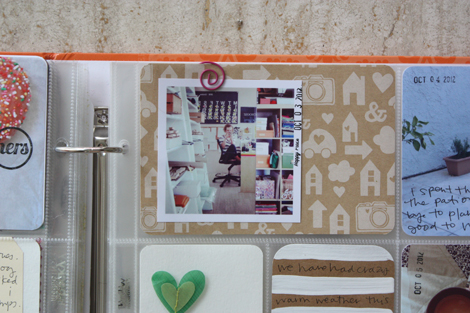
    like the lil embellie on the quote card this week. sweet. and the date stamp on the office pic, genius!

    Like

  4. tanya Avatar
    tanya

    It dawned on me the other day while I was looking at my PL supplies (I’ve planned to wait for the first of the year to start) I realized, that on each side of the plastics, you have to duplicate the layout behind it because of the pockets not being “double sided”. Does that get in the way at all of how to do your weekly layouts or do you just roll with it? Your thoughts?

    Like

  5. elise blaha Avatar

    It does not bother me at all. On the occasions where something is rounded corners on one side and square on the other, I just let it go. I always focus on getting it done, not getting it perfect. 🙂

    Like

  6. Nicole Foster Avatar
    Nicole Foster

    Hi Mrs. Elise – first let me start by saying that I love your PL layouts. You make it look so easy! I’ve attempted to start for the last 2 years, but get behind, then overwhelmed! My goal is to at least get going and work my way back. My question to you, and you may have answered this before but I can’t seem to find, is when you print the pictures for the smaller pockets, is that something that you do in PSE? That seems to be something that hangs me up in terms of completing my weeks. I have lots of pictures but they don’t all need to be 4×6. I don’t have PSE currently and have been trying to figure out how to print pictures smaller. Also, do you mainly put your trips in your PL weekly layouts or something else like a mini-book? So sorry for the long comment and bazillion questions! I want to get started catching up, but have to quiet the perfectionist in my mind! Thanks for your thoughts. 🙂

    Like

  7. elise blaha Avatar

    good questions! Yes, I do all of my cropping and printing from PSE. And I do almost everything in PL. If we take a trip or a ton of photos at one event, then I will add an insert right into the spread from that week. 🙂

    Like

  8. Amanda S Avatar
    Amanda S

    Hi Nicole, I’ve just discovered Picasa, its a free program (google it) and allows you to create and edit photos. Not as fab as PSE but for what i wanted (to be able to create a collage with two 2×3 pics on a 4×6 frame – so i can just print it then cut it into 2 to fit in project life.) I don’t have a printer at home so i get them printed outside so i save money by printing 2 pics in one 4×6.

    Like

  9. Nicole Foster Avatar
    Nicole Foster

    Thanks! I think in my product mania I bought some of the other types of pocket pages that might work. 1st big vacation trip in 13years + Hawaii = 5 million photos! 😀

    Like

  10. Nicole Foster Avatar
    Nicole Foster

    Thanks! I’ll look into it!

    Like

  11. Susan Avatar

    love the quote elise – abe rocks! is that another new pizza in the photo??? i’m thinking this next year i’m going to do (read brave) 40 breads for my family. i did (finishing up) 40 new recipes – your ideas are so inspiring…thanks so much for all the inspiration and making PL look like something i really want to do

    Like

  12. Pink Ronnie Avatar

    LOVE IT. Simple, colourful, fun and full of (your) personality!
    Ronnie xo

    Like

  13. J3SS1C4 Avatar

    Still hooked on how your hand writing on your photos! I wish I liked my writing enough to do this! I like your idea of embracing imperfection and filling in the goal card instead of reprinting… I wish I could do that, but I think it would drive me crazy!

    Like

  14. JillT Avatar
    JillT

    I just wanted to comment that I love these posts! You mentioned the time it takes, and it is appreciated. Have you ever mentioned if you keep up with it daily(ish) or if you save it all for one sitting?

    Like

  15. elise blaha Avatar

    I update the album a few times a week – maybe 3? So by the end of the week, it is pretty much complete.

    Like

  16. Katherine Avatar

    Where can I get the journal cards with quotes on them (i.e. Whatever you are be a good one)? Wasn’t sure if they were part of PL kits, sold separately…thanks!

    Like

  17. Skye Avatar

    I love the quote! My best friend is doing PL for the first time this year and she’s including an Abraham Lincoln quote every week. 🙂

    Like

  18. elise blaha Avatar

    I make them myself. They are not for sale. 🙂

    Like

  19. Katherine Avatar

    I’d buy them. Just sayin…. Thx for the reply!

    Like

  20. meg Avatar

    Hey Elise, your Project Life books are AMAZING, so inspiring. I also had a printing photos question..
    I can not figure out how to print more then one picture at a time.. have you done a tutorial for printing pictures in the past? Or perhaps you would be up for making a video with your amazing how-to’s? I’d love to know how you print all of your project life photos, big and small, and how you print more then just one picture at a time. Thanks so much!

    Like

  21. elise blaha Avatar

    thanks Meg! I will work on getting a video together. 🙂

    Like

  22. Daphna Avatar
    Daphna

    Hey Elise, just kidding here – but you realize that officially the PL is now longer than a pregnancy? after crossing the 40 weeks line 🙂

    Like

  23. elise blaha Avatar

    you are so right! I had not thought of it that way! I wonder which will seem faster. 🙂

    Like

  24. A0 Laminators Avatar

    I love all the stuff you put on here. Hope I can make a kind of this for our memorabilia.

    Like

  25. -Michelle Avatar

    Hi Meg – Think of it like cutting numerous pics out of a magazine, then glueing them all down onto a white piece of paper and then photocopying the paper.
    You could create a blank “canvas” in your software program (a blank document, white, at 300 dpi) at any standard size, like 8×11 or something.
    Then you can open up multiple photos. Click on each photo. In my PS (not PSE) I do a “select all” and then use the Move tool to drag the photo to my blank white document. Move the photo so it’s on one side. Then do this again with another pic. Basically move them around so the multiples are showing and not overlapping each other.
    Usually this creates multiple layers since each pic is on it’s own layer. Your software may differ. I flatten the image using a keyboard shortcut (found on the drop down triangle on the layers palette). Then I save it and print it.

    Like

  26. labels Avatar

    I love your concept! Great samples of your projects… were looking forward for more set of labels and stamps. Thanks for sharing!

    Like

Leave a comment